Choose your model
Not sure which one you have? A device with a screen shipped before 5 September 2026 is generation 1, from that date generation 2. The Lite has no screen. Your device also shows its version and generation on its own Update firmware page.
Pylon-Monitor v3.4.4 Generation 2
Released 25/10/2026 · 1360 KBv3.4.4 — fewer restarts, automatic once installed:
- Unexpected restarts (“Task watchdog” in the Event log). When sending to the online dashboard dragged on (weak WiFi, slow server), the device could wait up to two minutes and then restart. It now gives up after 12 seconds and simply tries again two minutes later.
- “Main loop blocked” no longer appears in the Event log for the normal time it takes to read a large stack — only for a real freeze.
- Older batteries that never report their health (for example first-generation US3000 next to a US5000): the device stops asking them at every cycle, so the rest of the stack is read faster. Their health and cycles stay shown as “—”.
- New in the JSON API and MQTT:
reset_timesfor each battery, the number of BMS restarts reported by the battery itself. - Access key (Settings → Public JSON access): only 8 to 32 letters and digits are accepted, as the online dashboard requires. A key with dashes or spaces could never send any data.
- New look for the device’s dashboard: clearer cards and colours, a redesigned charge history chart (smooth curve, time and value on hover or touch), a colour-coded charge state, and the full width of computer and TV screens.
- Device temperature: the temperature inside the device, with the highest ever recorded and its date, now appears on the dashboard, in the JSON API, in MQTT and in the online dashboard history.
v3.4.3 — fixes, automatic once installed:
- Screen: the volts / amps / watts at the top right no longer go blank for a moment when the battery percentage changes.
- Online dashboard that stopped receiving data (seen on large stacks): if nothing could be sent for 20 minutes while the WiFi works, the device restarts quietly by itself, at most once an hour. No data is sent to the online dashboard while a firmware update is being installed.
- Event log: every automatic restart now gives its reason, for example “Software restart (WiFi lost for 5 min)”.
- Your router’s list of connected devices now shows the device under its own name (pylon-monitor).
v3.4.2 — three fixes, all automatic once installed:
- “No battery data” although the cable is in the CONSOLE port. After a power cut, some Pylontech batteries start their console in a 1200 baud mode and answer nothing. As long as the battery stays silent, the device now sends it the wake-up command. It changes no battery setting, and a battery that already answers never receives it. Event log: “Console wake-up sent at 1200 baud”, then “Battery console answered after the 1200 baud wake-up” if that was the cause.
- WiFi stuck on 0.0.0.0 until you unplug the device. If the connection drops and does not come back on its own, the device reconnects by itself after 1 minute, then after 3 minutes, and as a last resort restarts quietly after 5 minutes — at most once every 30 minutes, so a router switched off at night causes no restart loop. A working connection is never touched. Event log: “WiFi back after … s”.
- Stacks of several batteries: SOH and cycles missing on some of them. A battery further down the stack sometimes answers the health query late. The device now waits for its complete answer and asks again once if needed. To see exactly what one battery replies, open
http://<device IP>/raw?unit=7(7 = battery number) and reload after a few minutes.
v3.4.1 — you stay signed in for a year, and every battery keeps its own identity on large packs.
- Enter your password once per browser: it is no longer asked again after a power cut, an update or a restart.
- Large and mixed packs (e.g. US5000 + US3000C): model, serial number and cycles always shown on the right battery.
Since v3.4.0 — a password is now required, as European cybersecurity rules for connected devices (EN 18031) demand.
- After the update, create your own password: there is no default password.
- REST tools (Home Assistant, Node-RED…): add
?key=…from Settings → Public JSON access. MQTT unchanged. - Cloud data sent over HTTPS, server certificate checked.
- Forgot it? 3 presses on the reset button, or unplug the USB cable 3 times.
⚠︎ Only for devices with a screen shipped from 5 September 2026 (generation 2).
Erases the device completely and reinstalls it from scratch, which an ordinary update never does. Useful if your device keeps dropping off your WiFi even after updating. You set your WiFi up again afterwards.
Previous versions (10)
-
Pylon-Monitor v3.4.3 Generation 2Fixes the volts / amps / watts on the screen, restarts quietly if the online dashboard stops receiving data, and shows the reason for every restart. Includes everything from v3.4.2. Replaced by v3.4.4 — please update.
-
Pylon-Monitor v3.4.2 Generation 2Wakes up batteries whose console stays silent after a power cut (1200 baud mode). Reconnects the WiFi by itself when it drops for good. Includes everything from v3.4.1. Replaced by v3.4.4 — please update.
-
Pylon-Monitor v3.4.1 Generation 2Stays signed in for a year, through restarts and updates. Large and mixed packs: each battery keeps its own model, serial number and cycles. Includes the v3.4.0 password protection. Replaced by v3.4.4 — please update.
-
Pylon-Monitor v3.4.0 Generation 2 Superseded — no longer distributedPassword required (EN 18031). Replaced by v3.4.4 — please update.
-
Pylon-Monitor v3.3.3 Generation 2Steadier WiFi on generation 2. Replaced by v3.4.4 — please update.
-
Pylon-Monitor v3.3.2 Generation 2 Superseded — no longer distributedRefreshed its WiFi link in the background, which could cut the connection. Replaced by v3.3.3 — please update.
-
Pylon-Monitor v3.1.0 Generation 2 Superseded — no longer distributedThe device fetches and installs its own updates.
-
Pylon-Monitor v3.0.1 Generation 2 Superseded — no longer distributedDiagnostics panel for packs of two batteries or more.
-
Pylon-Monitor v2.9.6 Generation 2 Superseded — no longer distributedRestarted itself every 5–15 min on generation 2. Fixed in v3.1.0 — please update.
-
Pylon-Monitor v2.8 Generation 2 Superseded — no longer distributedThe web server could hang on a dead connection. Fixed in v2.9.6 — please update.
Pylon-Monitor v3.1.2 Generation 1
Released 03/10/2026 · 599 KBv3.1.2 — you stay signed in for a year, and every battery keeps its own identity on large packs.
- Enter your password once per browser: it is no longer asked again after a power cut, an update or a restart.
- Model, serial number and cycles always shown on the right battery.
Since v3.1 — a password is now required, as European cybersecurity rules for connected devices (EN 18031) demand.
- After the update, create your own password: there is no default password.
- REST tools (Home Assistant, Node-RED…): add
?key=…from Settings → Public JSON access. MQTT unchanged. - Forgot it? Press the reset button 3 times, each within 8 seconds of the last.
- Same memory-light base as v3.0; every other setting is kept.
⚠︎ Only for devices with a screen shipped before 5 September 2026 (generation 1).
Erases the device completely and reinstalls it from scratch, which an ordinary update never does. Useful if your device keeps dropping off your WiFi even after updating. You set your WiFi up again afterwards.
Previous versions (14)
-
Pylon-Monitor v3.1 Generation 1 Superseded — no longer distributedPassword required (EN 18031). Replaced by v3.1.2 — please update.
-
Pylon-Monitor v3.0 Generation 1Uses much less memory, for packs of several batteries. Replaced by v3.1.2 — please update.
-
Pylon-Monitor v2.9.6 Generation 1Previous recommended version for generation 1. Replaced by v3.0.
-
Pylon-Monitor v2.8 Generation 1 Superseded — no longer distributedThe web server could hang on a dead connection. Fixed in v2.9.6 — please update.
-
Pylon-Monitor v2.7 Generation 1Public JSON was broken on packs with more than one battery.
-
Pylon-Monitor v2.6 Generation 1MQTT settings take effect immediately; Pushover alerts no longer restart the device.
-
Pylon-Monitor v2.5 Generation 1Single source for both boards, and the WiFi password is checked before saving.
-
Pylon-Monitor v2.4 Generation 1Endless restarts on packs of four batteries or more, and wrong voltage on large packs.
-
Pylon-Monitor v2.3 Generation 1First fixes for multi-battery packs. Superseded by v2.4.
-
Pylon-Monitor v2.2 Generation 1Quieter status light, internet clock with time zone, optional night mode.
-
Pylon-Monitor v2.1 Generation 1Battery values located by name instead of position. Reset button no longer loops.
-
Pylon-Monitor v2.0 Generation 1Captive portal, up to 16 batteries, history with CSV export, MQTT, Pushover alarms.
-
Pylon-Monitor v1.1 Generation 1 Superseded — no longer distributedJSON API, browser update page, factory reset button.
-
Pylon-Monitor v1.0 Generation 1 Superseded — no longer distributedInitial public release.
Pylon-Monitor Lite v1.1.4 Lite
Released 25/10/2026 · 1305 KB · Lite (no screen)Lite v1.1.4 — fewer restarts, automatic once installed:
- Unexpected restarts (“Task watchdog” in the Event log). When sending to the online dashboard dragged on (weak WiFi, slow server), the device could wait up to two minutes and then restart. It now gives up after 12 seconds and simply tries again two minutes later.
- “Main loop blocked” no longer appears in the Event log for the normal time it takes to read a large stack — only for a real freeze.
- Older batteries that never report their health (for example first-generation US3000 next to a US5000): the device stops asking them at every cycle, so the rest of the stack is read faster. Their health and cycles stay shown as “—”.
- New in the JSON API and MQTT:
reset_timesfor each battery, the number of BMS restarts reported by the battery itself. - Access key (Settings → Public JSON access): only 8 to 32 letters and digits are accepted, as the online dashboard requires. A key with dashes or spaces could never send any data.
- New look for the device’s dashboard: clearer cards and colours, a redesigned charge history chart (smooth curve, time and value on hover or touch), a colour-coded charge state, and the full width of computer and TV screens.
- Device temperature: the temperature inside the device, with the highest ever recorded and its date, now appears on the dashboard, in the JSON API, in MQTT and in the online dashboard history.
Lite v1.1.3 — fixes, automatic once installed:
- Online dashboard that stopped receiving data (seen on large stacks): if nothing could be sent for 20 minutes while the WiFi works, the device restarts quietly by itself, at most once an hour. No data is sent to the online dashboard while a firmware update is being installed.
- Event log: every automatic restart now gives its reason, for example “Software restart (WiFi lost for 5 min)”.
- Your router’s list of connected devices now shows the device under its own name (pylon-monitor).
Lite v1.1.2 — three fixes, all automatic once installed:
- “No battery data” although the cable is in the CONSOLE port. After a power cut, some Pylontech batteries start their console in a 1200 baud mode and answer nothing. As long as the battery stays silent, the device now sends it the wake-up command. It changes no battery setting, and a battery that already answers never receives it. Event log: “Console wake-up sent at 1200 baud”, then “Battery console answered after the 1200 baud wake-up” if that was the cause.
- WiFi stuck on 0.0.0.0 until you unplug the device. If the connection drops and does not come back on its own, the device reconnects by itself after 1 minute, then after 3 minutes, and as a last resort restarts quietly after 5 minutes — at most once every 30 minutes, so a router switched off at night causes no restart loop. A working connection is never touched. Event log: “WiFi back after … s”.
- Stacks of several batteries: SOH and cycles missing on some of them. A battery further down the stack sometimes answers the health query late. The device now waits for its complete answer and asks again once if needed. To see exactly what one battery replies, open
http://<device IP>/raw?unit=7(7 = battery number) and reload after a few minutes.
Lite v1.1.1 — the same changes as v3.4.1: you stay signed in for a year, and every battery keeps its own identity on large packs.
- Enter your password once per browser: it is no longer asked again after a power cut, an update or a restart.
- Large and mixed packs (e.g. US5000 + US3000C): model, serial number and cycles always shown on the right battery.
Since Lite v1.1.0 — the same changes as v3.4.1: a password is now required, as European cybersecurity rules for connected devices (EN 18031) demand.
- After the update, create your own password: there is no default password.
- REST tools (Home Assistant, Node-RED…): add
?key=…from Settings → Public JSON access. MQTT unchanged. - Cloud data sent over HTTPS, server certificate checked.
- Forgot it? 3 presses on the reset button, or unplug the USB cable 3 times.
⚠︎ Only for the Pylon-Monitor Lite, the model without a screen.
Erases the device completely and reinstalls it from scratch, which an ordinary update never does. Useful if your device keeps dropping off your WiFi even after updating. You set your WiFi up again afterwards.
Previous versions (7)
-
Pylon-Monitor Lite v1.1.3 LiteThe same changes as v3.4.3 (except the screen fix), for the Lite. Only for the Lite — models with a screen use v3.4.3 or v3.1.2. Replaced by Lite v1.1.4 — please update.
-
Pylon-Monitor Lite v1.1.2 LiteThe same changes as v3.4.2, for the Lite. Only for the Lite — models with a screen use v3.4.2 or v3.1.2. Replaced by Lite v1.1.4 — please update.
-
Pylon-Monitor Lite v1.1.1 LiteReplaced by Lite v1.1.4 — please update.
-
Pylon-Monitor Lite v1.1.0 Lite Superseded — no longer distributedReplaced by Lite v1.1.4 — please update.
-
Pylon-Monitor Lite v1.0.2 LiteReplaced by Lite v1.1.2 — please update.
-
Pylon-Monitor Lite v1.0.1 Lite Superseded — no longer distributedReplaced by Lite v1.0.2 — please update.
-
Pylon-Monitor Lite v1.0 Lite Superseded — no longer distributedFirst release for the Pylon-Monitor Lite, the model without a screen: the same code and fixes as v3.3.2, without the screen settings. Only for the Lite — models with a screen use v3.3.2 or v2.9.6.
How to update
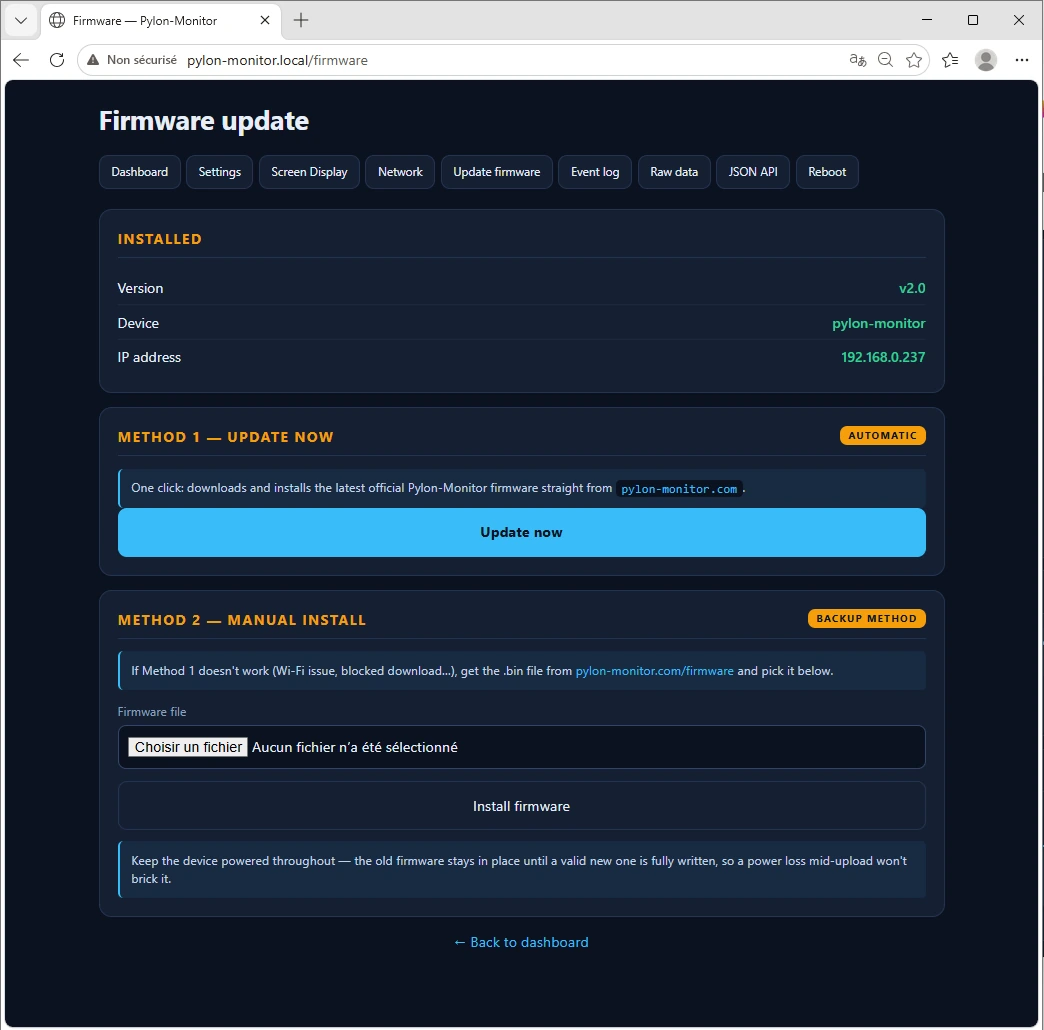
Update in 4 steps
Easiest: if your dashboard's Update firmware page shows an Update now button, click it — the device downloads and installs the latest version by itself. Otherwise:
- Download the
.binbelow. On Windows, right-click it first → Properties → tick Unblock, otherwise the upload fails without saying why. - Open your dashboard → Update firmware.
- Choose the file and click Install firmware.
- The device restarts into the new version in under 30 seconds. Every setting is kept.
The last step asks for the email you used at checkout. If it matches an order, the file starts right away. If not, we review it by hand — you will have it within 24 hours.
Already signed in to your account? The button below skips the email step too.