Compatibility
Which Pylontech batteries are supported?
Both Pylontech families, low voltage and high voltage. Low voltage: US5000 (also sold as US5000C / US5000-1C), US3000C, US3000, US2000C, US2000B+ and UP2500 (4-pin RJ11 Console port: RJ11-to-RJ45 adapter cable) and the Force-L1 family — every unit reads those. High voltage: Force H2 towers and H48050 modules behind a management unit, since firmware 2.8 and on the hardware generation shipped with orders placed from 5 September 2026. In both cases the connection is the same: the "Console" RJ45 port, RS-232, 115200 baud. If your battery has one, it works.
Does it work with high-voltage Pylontech (Force-H, H48050)?
Yes, since firmware 2.8 — on the new hardware generation, which every unit ordered from 5 September 2026 carries. A high-voltage pack does not answer like a low-voltage one: its management unit reports the whole tower in a single reply and returns every cell of the pack at once. The firmware recognises that from the first reply and switches to the right questions on its own, with nothing to configure. Charge, voltage, current, temperatures, every module and every cell then appear exactly where they always do. Two limits we would rather state than let you discover: your management unit reports no state of health and no cycle count, so those two lines show a dash instead of an invented figure; and no real high-voltage pack has been connected to a Pylon-Monitor yet — this support was written from real console readings of two different management-unit firmwares. If yours answers differently, the device has a discovery page that collects what it says, and we extend it from there. Units shipped before 5 September 2026 read the low-voltage US series only.
Will it work with my BYD / Dyness / Seplos / other brand battery?
No. The Pylon-Monitor speaks the Pylontech console protocol. Other brands use different protocols (often Modbus or CAN) and are not compatible.
Can I monitor multiple stacked batteries? How many at most?
Yes — up to 16 batteries in total, on a single Pylon-Monitor. For example: 16× US5000 (≈76.8 kWh combined), 16× US2000 (≈38.4 kWh combined), or any mix such as 2× US2000 + 2× US3000 + 1× US5000 chained together. Plug the RJ45 cable into the Console port of the master battery only (never a slave unit, and never the RS485/CAN/Link port) — the master relays the query to every unit in the chain over their internal link. Pylon-Monitor detects and shows each physical battery individually (SOC, voltage, current, power, state, SOH, cycles, temperatures), all 16 if you have that many. Every cell of every battery is read and shown too, on the Cells card, for all 16 (the former limit of about 4 batteries for the per-cell detail was removed in the firmware of September 2026). One catch: the batteries themselves must be chained correctly — the link cable leaves LINK PORT 1 on the master and goes into LINK PORT 0 on the next one, then 1 → 0 again for each battery after that. Chained wrongly, the master has nothing to relay and you will only ever see one battery.
V2 with screen or Lite without a screen — which one should I choose?
Both run the same firmware, the same web dashboard, the same JSON API, Home Assistant and the free Cloud. The V2 adds a 1.8″ screen showing the battery at a glance without a phone. If the battery sits in a garage or a cabinet nobody looks at, the Lite does exactly the same job for less. Both models are presented side by side in the order section.
I have several towers or stacks, or several inverters in parallel. How many Pylon-Monitors do I need?
One per stack, plugged into that stack's master (for high-voltage packs, into each tower's controller). Give each one its own name in Settings: each gets its own address, appears as its own device in Home Assistant, and all of them can be linked to the same free Cloud account. The inverter link is not affected: the Pylon-Monitor uses the separate Console port.
Is there a wired Ethernet version?
Not today: both models connect over WiFi only. A wired version has been suggested by customers and is under consideration.
Does it work on 5 GHz WiFi?
It needs a 2.4 GHz network — like almost every smart-home device. Routers that broadcast 2.4 and 5 GHz under one name are normally fine. If yours is set to WPA3 only, allow WPA2/WPA3, or use a separate 2.4 GHz or guest network.
My batteries have a small 4-pin Console socket (RJ10/RJ11), e.g. US2000B, US2000 Plus or US2500. Does it work?
Yes, with an RJ11-to-RJ45 adapter cable, easy to make yourself: RJ11 pin 2 → RJ45 pin 6, pin 3 → pin 3, pin 4 → pin 8. Pin 3 is the battery’s TX and pin 2 its RX: nothing needs to be crossed, the Pylon-Monitor does it. On a 4-contact RJ11 plug, count only those 4 contacts. Ready-made “RJ11 to RJ45” cables are usually wired pin to pin and will not work. If no data arrives, swap the wires of RJ11 pins 2 and 3 (harmless). The RJ45 end goes into the Pylon-Monitor, the RJ11 end into the Console port of the master battery. The US2000C, US3000C and US5000 have an RJ45 Console port and use the supplied cable.
How many batteries can one Pylon-Monitor read? What about a large system with an LV-HUB?
Up to 16 batteries in one group, through the Console port of that group's master. Larger systems are made of several groups joined by an LV-HUB: you then need one Pylon-Monitor per group (at least 5 for 80 batteries, for example). It reads the batteries, not the hub itself.
Monitoring, viewing & checking
How do I view my Pylontech battery data?
Four different things get called a Pylontech viewer, and each shows a different slice of the data: Pylontech's own PYLON Console software on a laptop, your inverter's screen or app, a permanent web dashboard on your network, or your own display built on a JSON API. We compare all four, including when the free laptop route is the right answer, in the Pylontech viewer guide.
How do I check whether my Pylontech battery is healthy?
Eight readings are worth verifying: SOC, SOH, pack voltage, current, per-cell voltages, the cell-imbalance trend, temperatures, and alarm flags plus cycle count. The front-panel LEDs give you a five-second liveness check but say nothing about health. The full Pylontech check checklist is here, and what each number actually means is here.
Is “Pylontech check” the same thing as PylonCheck?
No — and search results confuse them constantly. A Pylontech check is the procedure of inspecting your battery's readings, with any tool you like. PylonCheck is a specific commercial product from Daxit s.r.o., a cloud-based monitoring box. Our point-by-point comparison covers it honestly, including the two areas where it does more than we do.
Can I see per-cell voltages and per-module SOH?
Yes, because the Pylon-Monitor reads the Console (RS-232) port. Your inverter cannot show you these: it uses the CAN or RS485 link, a control protocol that deliberately describes the whole stack as one virtual battery, so per-module SOH, individual cell voltages and per-module temperatures are never sent over it at all.
Why does the SOH shown differ from my inverter's?
Both can be right. The combined SOH is the average of what each battery reports, while many inverters weight the pack toward its weakest battery, since that one limits the usable capacity. The health of each battery is shown individually, so you can see which one pulls the average down. More in our customer questions.
Can it tell me how long my battery will last?
Yes, in the free online dashboard: it shows the energy stored in kWh and, as soon as power flows, “at this rate: 3 h 20 until empty” or “full in 2 h”. The same estimate directly on the device is planned for a future firmware.
Can I export my data?
Yes. The device exports its recent readings as CSV. The free online dashboard exports your whole history: one file for the pack, and one “per battery” with every cell of every battery in mV.
Does Pylon-Monitor balance my cells?
Pylon-Monitor runs the whole balancing for you with Smart Balance, on your free online dashboard. It measures every full-charge window automatically, gives your pack a balance score and names any cell that stays behind. When a balance is due, one click starts a guided session: the exact settings for your inverter, a 2-hour window that opens by itself at 98 %, every cell followed live and a before/after report by e-mail. The balancing itself happens inside the Pylontech, through its own BMS, exactly as the manufacturer designed it. How cell balancing works.
How do I know whether my cells need balancing?
Open the Smart Balance card on your dashboard: a balance score out of 100 and a plain verdict — balanced, balance recommended, under watch, or weak cell suspected. It is based on what your BMS actually achieved during each recent full charge, plus how many days since the last one, and a colour map of every cell shows where the gap is.
How often should a Pylontech be balanced?
A pack that reaches 100 % regularly balances by itself. If yours rarely gets above 80–90 %, one full charge held for about two hours each month keeps the cells together. Smart Balance tells you when it is due and walks you through it, inverter by inverter.
On my large mixed stack, some batteries show the wrong model, serial number or cycles.
This was a firmware issue on big mixed stacks (for example 4 × US5000C + 4 × US3000C): a battery's answer could arrive late and be attributed to the next battery. It is fixed in firmware v3.4.1 (3 October 2026): every answer is now checked against the battery it came from, and each battery's model, serial number and cycles correct themselves within a few minutes of updating. Update from Update firmware on the dashboard.
Free Cloud & remote access
What is the Pylon-Monitor Cloud and how much does it cost?
It is your online dashboard: your battery live from anywhere, 3 years of history, an email if the device goes quiet, cell-balance advice, a public JSON link and CSV exports. It is 100% free, with no subscription, and entirely optional — the device keeps working locally without it.
How do I connect my battery to the Cloud?
On your home WiFi, open http://pylon-monitor.local → Settings → Public JSON access. Press Generate random key if the key is empty, tick Enable a real public URL (via pylon-monitor.com) and save. Then sign in on the dashboard with your order email and paste the key. Two minutes, once.
What do I see in the online dashboard?
The whole pack and each battery: energy stored, charge, power, voltage, current, temperatures, health, cycles, every cell in mV with the lowest and highest highlighted, battery-by-battery comparisons, daily kWh in and out, and curves over 24 h, 7 days, 30 days or a year. It refreshes itself every minute.
How long is my history kept?
Every reading for 7 days, 5-minute averages for 90 days, then hourly averages for 3 years. Free, whatever the number of batteries.
Will I be warned if my Pylon-Monitor stops working?
Yes. The device cannot report its own power cut, so we watch for it: after 6 hours without news we send you an email, in your language, with what to check first.
Who can see my data? What is the public JSON link for?
Your dashboard is only visible to you, behind your account. The public JSON link lets tools like Home Assistant or a widget read your figures from anywhere; anyone who has that link can read them (never change anything), so only give it to tools you trust. Untick the setting on the device to stop everything; disconnecting the device from your account deletes its history.
Does my device still work if the Cloud or the internet is down?
Yes. The screen, the local dashboard, the API and Home Assistant keep working on your own network. Only the online dashboard stops receiving new readings until the connection comes back.
I am an installer: can I follow several customer sites?
Yes. The fleet view shows all the sites you look after on one screen, the ones needing attention first. Each site is added with its access key, without taking it away from its owner.
Can I open a port on my router to reach the device from outside instead of using the Cloud?
Technically yes: forward an external TCP port to the device's address on port 80 (HTTP — no UDP needed). We do not recommend it: the dashboard is then exposed to the whole internet, unencrypted. The free Cloud (the device sends its data out by itself, nothing to open on your router) or your router's built-in VPN are much safer ways to see it from outside.
How can my installer see my batteries without my password?
Your installer creates a free account, opens the fleet view and adds your installation with its Access key (device Settings → Public JSON access). They see all the battery detail without your password, and you keep your own access.
I can't find Smart Balance on the online dashboard.
The Smart Balance card only appears once your device is linked to your account (see “How do I connect my battery to the Cloud?”). It then sits at the bottom of the dashboard, with the button Start a guided balance.
Installation
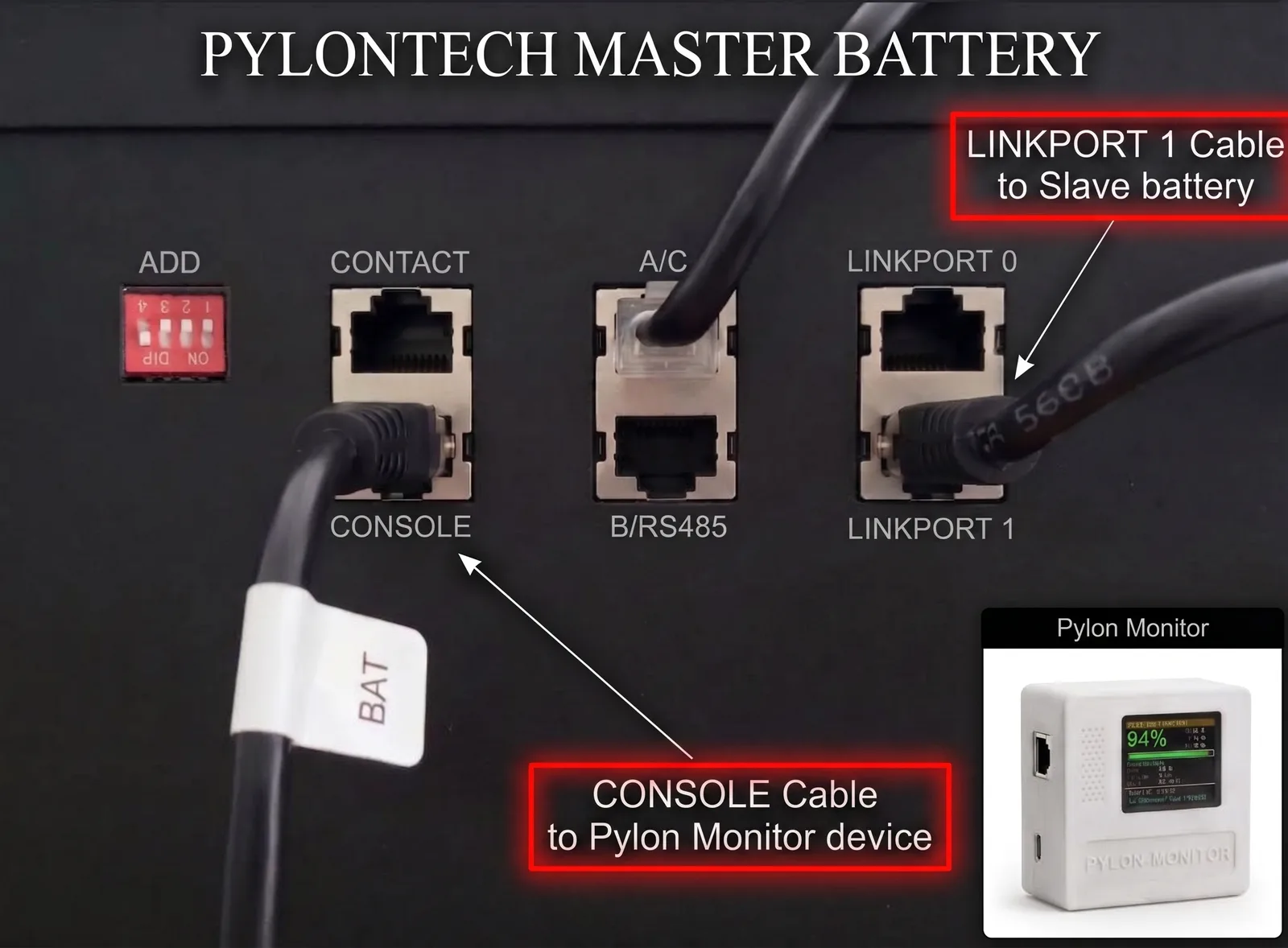
The cable that chains your master battery to the first slave must leave LINK PORT 1 on the master — never LINK PORT 0. It plugs into LINK PORT 0 on the slave, and every further battery repeats the same 1 → 0 pattern. Wired the other way round the master never sees the rest of the stack, so Pylon-Monitor reports a single battery no matter how many you own.
Do I need to build this myself — a Raspberry Pi, a microcontroller, flashing firmware?
No. Pylon-Monitor ships as a finished, fully assembled device — there is nothing to build, solder or flash. Plug the included RJ45 cable into the battery's Console port, plug in the included USB cable for power, join the device's WiFi setup portal, and you are done in under 2 minutes. Some unrelated open-source projects with similar-sounding names ask you to buy your own hardware and flash your own code; that is not what this product is.
Which RJ45 port should I use?
The one labeled Console. Not RS485, not CAN, not Link. Look for the small "Console" silkscreen near the port on the top of the battery.
Will it interfere with my inverter?
No. The inverter typically talks to the battery on the CAN or RS485 port. The Console port is a separate, independent interface designed for monitoring and diagnostics.
Does it need a special cable?
No. Any standard straight-through Ethernet RJ45 cable works. One is included in the box.
How much does the package weigh?
The device alone is 79 g; the RJ45 console cable and USB-C power cable together add 14 g, for a 93 g net weight. With packaging, the parcel that ships weighs 200 to 249 g at most.
How do I power it?
Any 5V USB source. A phone charger, a USB port on your inverter, a power bank, a Raspberry Pi… The device draws under 0.5 W.
Where does the LINK PORT cable go — and why does it matter?
The cable that chains your master battery to the first slave must leave LINK PORT 1 on the master — not LINK PORT 0, which is what most people assume. It plugs into LINK PORT 0 on the slave, and every further battery repeats the same 1 → 0 pattern. Wired the other way round the master never sees the rest of the stack, so Pylon-Monitor reports a single battery no matter how many you own. The Pylon-Monitor itself always goes into CONSOLE on the master — see the photo above.
What do I need besides the box?
Only a 5 V USB power source: a phone charger, a USB port on your inverter, a power bank… The RJ45 console cable and the USB cable are included. No app, no account, no tools.
Is there an app? Does it work on iPhone, iPad and Android?
No app to install: the dashboard opens in any browser — Safari on iPhone or iPad, Chrome on Android, any computer. You can add it to your home screen like an app.
Can I use a longer cable to install it further away?
Yes, any standard straight-through RJ45 cable works. Up to about 10 metres (Cat5e or Cat6) is fine: the console link is a serial (RS-232) connection, made for short distances. If you need to go further, place the Pylon-Monitor near the battery and let WiFi cover the distance.
How do I find its IP address, or give it a fixed one?
Type http://pylon-monitor.local, read the address at the bottom of the screen (V2), or look in your router's list of connected devices. To keep it fixed, reserve that address for the device in your router (DHCP reservation).
How much power does it use? Can it run on a power bank?
Under 0.5 W: at most 100 mA at 5 V, about 2.4 Wh a day. A 20,000 mAh power bank (about 60 Wh really usable) lasts at least about three weeks.
Troubleshooting
During setup, the device will not join my WiFi.
Do the setup within about 5 m of the router, make sure a 2.4 GHz network is available (avoid WPA3 only), retype the password character by character, and power it from a 5 V / 2 A wall charger. Step-by-step answer.
It keeps disconnecting from WiFi or restarting.
Install the latest firmware first — recent versions fix most WiFi drops. Then use a 5 V / 2 A wall charger rather than a weak USB port, and check the signal strength in the dashboard. Still happening? Send us the event log (Event log button on the device's dashboard) via the contact page — we reply, and replace the device if needed.
The screen stays white, or the device no longer starts after an update.
Usually an interrupted update. If http://pylon-monitor.local still answers, just install the firmware again. Otherwise, Reset via USB reinstalls it from Chrome or Edge with a USB data cable, in a few minutes.
The screen turns off by itself from time to time. Is that normal?
If night mode is on (Settings → Night mode), the screen switches off between the hours you chose — readings keep updating. If it goes dark at random and comes back, the device is restarting: see “It keeps disconnecting from WiFi or restarting” above.
The dashboard shows dashes or no battery data.
Check that the cable is in the port labelled Console of the master battery (not RS485, CAN or Link), that the battery is switched on, and that the cable is fully clicked in at both ends. Wiring guide.
The dashboard no longer refreshes after an update.
Your browser is probably still using the old page: reload with Ctrl+F5, or close and reopen the tab on a phone.
My online dashboard has gaps in the curves.
A gap means we received nothing during that time — usually a WiFi drop or a power cut on the device. We never draw a line across it, so gaps are real. If they are frequent, see “It keeps disconnecting from WiFi or restarting”.
I did a full reset and my online dashboard stopped receiving data.
A full reset creates a new access key and switches the Cloud link off, so the old key no longer matches. Open the device's dashboard → Settings → Public JSON access, click Generate random key, tick Enable a real public URL (via pylon-monitor.com) and Save. Wait about two minutes for the first data, then add the new key on your account page (Link this device). Your history stays with your account; the new key simply continues it.
The Cloud still receives nothing, and the Event log has no “Clock synchronised (NTP)” line.
The link to the Cloud is encrypted, so the device needs the correct time before it sends anything — and without the time it waits silently. A minute after WiFi connects, the Event log should show Clock synchronised (NTP), then Public JSON URL push: success every couple of minutes. If the first line never appears, the device cannot reach a time server. The usual cause is a fixed IP address with a missing or wrong DNS server (one wrong digit is enough). Open the Network page: either clear the fixed-IP fields to go back to automatic addressing (DHCP), or fill the DNS field with your router's address. Save, then unplug the device for 10 seconds.
Where is the Event log, and what should I look for in it?
On the device's dashboard, click Event log in the top bar. It lists what the device has done since it started. Useful lines: WiFi connected: <address> (it joined your network), Clock synchronised (NTP) (it has the time), Public JSON URL push: success (the Cloud is receiving data), and Radio: weak board -> TX power … (the firmware lowered the radio power to keep the WiFi stable). A screenshot of this page is the first thing we ask for when something does not work.
Is it normal that the device is unreachable for the first minutes after power-up?
A little, yes. After a start the firmware measures your WiFi signal and adjusts its radio power step by step until it stabilises, so the page may not answer for the first two or three minutes. Give it at least 10 minutes on the latest firmware, without unplugging it, before judging. If the address is still 0.0.0.0 or the page never answers after that, send us the Event log and the line shown at http://<device-address>/radio_mode.
The Event log keeps showing “HTTPS connection failed” and the online dashboard receives almost nothing.
The WiFi signal is too weak for the secure connection to the Cloud (the log may also say “weak board”). Install the latest firmware, then bring the device closer to the router or add a 2.4 GHz repeater: aim for a signal better than −70 dBm, shown on the device's dashboard.
On iPhone, I can't copy the firmware signature.
That came from our download page and is fixed: on the firmware page, the window now shows the signature with its Copy button first, and the file only downloads when you tap Download.
Warranty & safety
Will it void my Pylontech warranty?
No. The Console port is read-only in the way the Pylon-Monitor uses it. We send only standard diagnostic commands (pwr, info, bat, stat) — the same ones Pylontech's own console tool sends. We never change settings, never trigger calibration, never write configuration.
Is it electrically safe?
Yes. The Console port operates at standard RS-232 voltages (±12 V) and the Pylon-Monitor uses a galvanically rated transceiver. The USB power supply is fully separated from the battery's high-voltage side.
Can it update my batteries' firmware or change their settings?
No, never. The Pylon-Monitor is read-only: the firmware contains no write commands at all, so it cannot change anything in your batteries or their warranty. A BMS firmware update can only be done by Pylontech or your distributor.
What warranty and returns do I get?
A 2-year warranty against manufacturing defects, on top of the EU legal guarantee of conformity, and 14 days to change your mind after delivery. Just write to us with your order reference. Details in our terms.
Can it replace BatteryView remotely (logs, console commands, settings)?
No, it is a monitoring tool: it does not update the batteries' firmware, does not send free console commands and does not change any BMS setting. For logs you have the device's Event log, the raw replies of each battery (Raw data page) and, on the free online dashboard, up to 3 years of history with CSV export.
Network & security
Does it need an internet connection?
No. The device works 100% locally: its screen, its web dashboard and its JSON API only need your WiFi. Internet is only used if you switch on the optional free Cloud (to see your battery from anywhere) or check for a firmware update.
Do I need a VPN, Cloudflare Tunnel, or Home Assistant to check it remotely?
No — none of those are required. Remote access is a single checkbox built into the device itself: Settings → Public JSON access publishes your readings to a private, key-protected link at pylon-monitor.com, with no VPN, no Cloudflare Tunnel, no port forwarding, no dynamic DNS, and no need to install Home Assistant. By default the device runs entirely standalone on your local network, and this optional remote view stays off until you switch it on yourself. Home Assistant is a separate, entirely optional integration for automations — not a requirement to see your data from outside your home.
Does it phone home?
Not unless you ask it to. No telemetry, no analytics. It only contacts pylon-monitor.com in two cases you control: when you check for a firmware update, and — if you tick Enable a real public URL in its Settings — to send its readings to your free Cloud dashboard about every 2 minutes. Untick it and the sending stops immediately.
Is the dashboard password-protected?
Yes, always. On first access the device asks you to create your own password — there is no default password shared between devices — as required by the European cybersecurity rules for connected devices (RED directive, EN 18031 standard). Tools such as Home Assistant or Node-RED read /api.json with the Access key shown in Settings → Public JSON access.
I forgot my password — am I locked out?
No. Press the reset button (on the back of the enclosure) 3 times in a row — each within 8 seconds of the last, nothing to hold down. On generation 2 devices, unplugging and plugging back the USB cable 3 times in a row works too. It wipes all settings (WiFi, MQTT, alarms, password): join the PylonMonitor-Setup hotspot to set up your WiFi again, then create a new password — no old password needed, no support ticket required. See the installation guide for the full reset-levels breakdown.
I have no WiFi at home. Can I use the device's own network instead?
No: its own PylonMonitor-Setup network is only used for the first setup. But it does not need internet: a small, inexpensive 2.4 GHz WiFi router with no internet connection is enough for the local dashboard, MQTT and Home Assistant. Internet is only needed for the online dashboard.
Can I switch the device's dashboard to HTTPS?
No, the dashboard on the device works over HTTP only. It is protected by your password and only reachable from your home network. The data sent to our Cloud travels over HTTPS with the server certificate checked, and the online dashboard is HTTPS: use it for encrypted access, including from outside your home.
Integration
Home Assistant?
Yes, two ways: zero-YAML MQTT auto-discovery (10 sensors), or a short YAML paste — auto-generated by the device — for the built-in rest platform. See the integration guide.
Node-RED / Jeedom / Domoticz / openHAB?
Any tool that can poll an HTTP endpoint and parse JSON works. The endpoint is http://<device-ip>/api.json?key=<access-key> (Access key: Settings → Public JSON access).
Can I push data to InfluxDB / Prometheus?
Indirectly, yes — use any tool that can scrape an HTTP/JSON endpoint (Telegraf inputs.http, a small Python exporter, a Node-RED flow…) to forward /api.json to your time-series database.
Can I keep Solar Assistant, Victron or my inverter's monitoring at the same time?
Yes. They talk to the batteries over CAN or RS485; the Pylon-Monitor uses the separate Console port, so they never interfere.
SmartLife / Tuya, Shelly, IFTTT?
There is no native Tuya integration (it requires a paid developer licence). But the free Cloud gives you a public JSON link that IFTTT, Make.com, Apilio, a Shelly script or any automation tool can read — customers already use it that way.
Updates & support
How do I update the firmware?
Open the dashboard → Update firmware. Click Update now and the device fetches the latest version itself — or select a .bin downloaded from our firmware page and upload it manually. Either way the device reboots into the new version in about 20–30 seconds.
Are firmware updates really free for life?
Yes. We make money selling devices, not subscriptions.
I have a question that isn't here.
Email us at contact@pylon-monitor.com. We answer.
Do I have generation 1 or generation 2?
Every unit ordered from 5 September 2026 is generation 2, and the Lite is its screenless version. Open the firmware page from your home network or while signed in: it recognises your device and shows the right version for it.
The update says “success” but the version has not changed.
Check that the file matches your model (generation 1, generation 2 with screen, or Lite) — the firmware page shows the right one. Then reload the dashboard with Ctrl+F5 (or close and reopen the tab on a phone): the browser may still be showing the old page.
What should I send you so you can help quickly?
Four things solve most cases: (1) a photo of the battery ports with the cable plugged in, showing which port it is in; (2) a screenshot of the device's dashboard; (3) a screenshot of the Event log page after 10 minutes of running; (4) the firmware version and your order reference. For WiFi trouble, add the line shown at http://<device-address>/radio_mode. Reply to our e-mail or write via the contact page.
Orders, shipping & returns
Which countries do you ship to, and how much is delivery?
All of the EU, the United Kingdom, Switzerland, Norway and more. The exact cost for your country and the available carriers (home delivery or pickup point) appear at checkout as soon as you choose the country. Every parcel is tracked.
How long does delivery take?
You receive the tracking number by email as soon as the parcel leaves. The delivery time depends on the carrier and the country; the carrier's estimate appears in the tracking.
What about customs outside the EU (UK, Switzerland, Canary Islands…)?
We prepare the customs documents. Outside the EU customs area, the carrier may charge import VAT or fees on delivery, according to your country's rules.
Which payment methods do you accept?
Bank card (secured by Stripe) and PayPal. When SEPA bank transfer is offered at checkout, the order ships once the transfer has arrived.
Where do I find my invoice?
In your account → My orders, as soon as your order has shipped: Download invoice. It is also on your order page, linked from our emails. For a business, enter your company and VAT number in your profile.
Can I change my delivery address after ordering?
Yes, as long as the parcel has not left: reply to your order confirmation email, or write to us with your order reference, as quickly as possible.
My order was cancelled or refunded without my asking. Why?
This happens when we cannot ship to the destination or the payment could not be confirmed: the order is refunded in full automatically and you receive an email explaining why. Write to us — we will find a solution.
Do you work with installers and businesses?
Yes: business account with company name and VAT number on the invoices, a fleet view for all your customer sites, and a direct contact for larger quantities via the contact page.
Canary Islands: what about VAT and customs?
We deliver there regularly, with a customs declaration on the parcel. Our prices contain no VAT (French VAT franchise, art. 293 B CGI), so the price shown is already the net price; local import charges (IGIC) may be due on delivery. Put your DNI/NIE in the second address line: the carrier needs it.
Didn't find your answer?
A real person answers — most questions within 24 hours, in your language.
Help center · Community Q&A
Real questions from our customers
Compatibility, setup, Home Assistant, high voltage, ideas on the roadmap — asked by owners, answered by our team, in English and in their own language.
- AnsweredI am adding a sixth battery, a new US2000C from 2021 still in its box, at one green LED. Do I wait for all the others to be empty?
- ShippedCan I read the reset count of all my batteries directly from a URL, for ioBroker / Grafana?
- SolvedThe online dashboard stops receiving data overnight while the local page keeps working