Designed & made in France 6K fans on Facebook · Follow us
Engineered & quality-tested in-house · Live in < 2 min

Wireless (WiFi) monitoring & diagnostics
for your Pylontech battery.

A dedicated device that reads State of Charge, voltage, cell health and temperatures straight from your Pylontech US5000, US3000C or US2000 — and exposes it all through a clean JSON API for Home Assistant, Jeedom, Node-RED and more. Truly plug & play: one cable, one USB, one captive WiFi portal — under 2 minutes from box to live dashboard. No app, no account, no command line — and the cloud is optional (and free).

  • Live in under 2 minutes — captive portal, zero apps
  • Home Assistant ready — MQTT auto-discovery or REST, zero YAML
  • Up to 16 batteries chained — mixed Pylontech models supported
  • Engineered in-house and quality-tested before every shipment
  • Plug & play: 1 RJ45 + 1 USB cable, both included
  • Works in any browser — phone, tablet, PC
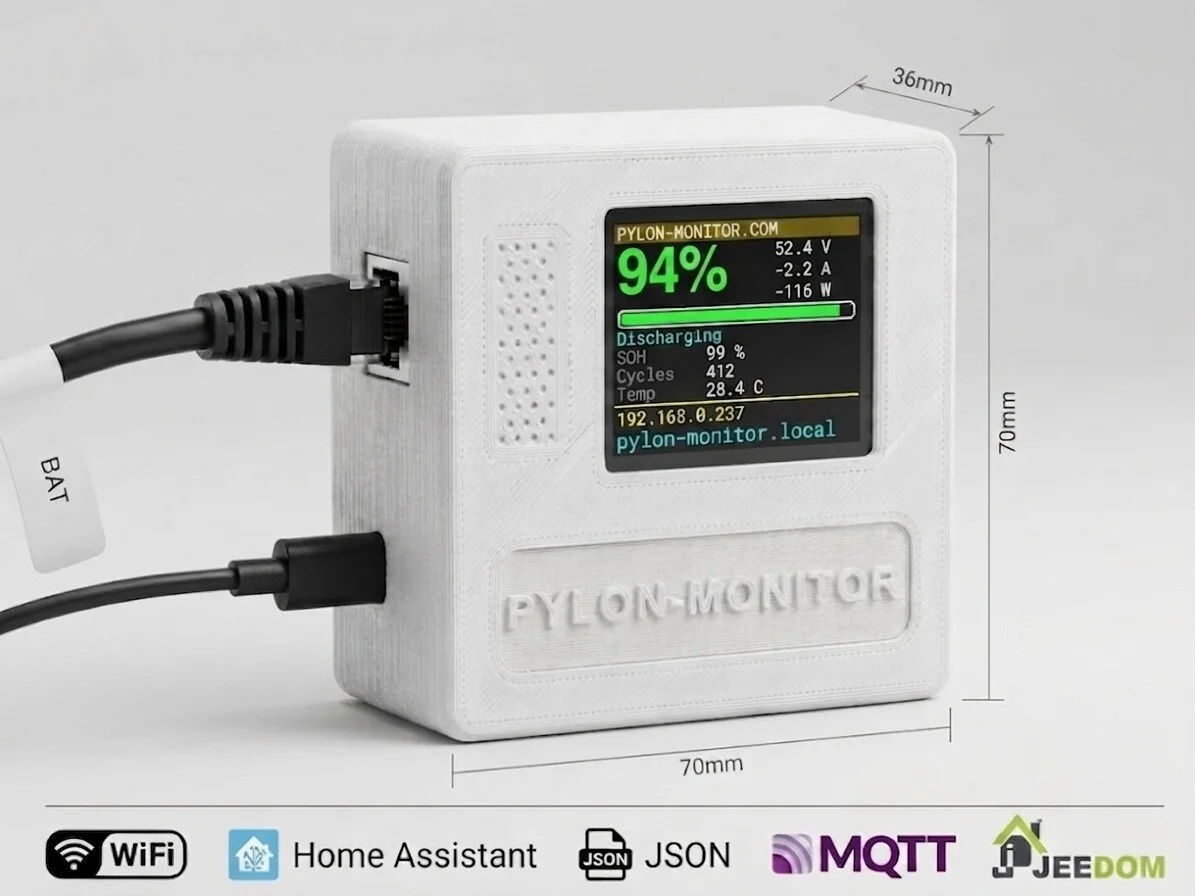
Pylon-Monitor — 70×70×36mm remote monitoring & diagnostics device for Pylontech batteries, with color TFT display, showing Home Assistant, JSON API, MQTT and WiFi compatibility On your local WiFi, or reachable anywhere via a private link
Pylon-Monitor Lite Pylon-Monitor Lite No screen · same firmware €49
See your Pylontech battery from anywhere in the world — or from nowhere but your own home.

Plug it into the battery's Console port, power it over USB, join your WiFi. From that moment you read state of charge, voltage, current, temperature, cell balance and BMS alarms — on the box's own screen, on your phone, in Home Assistant, and in your online dashboard the moment you switch it on. Here the cloud is a feature, not a dependency: turn it off and everything else carries on.

Pylon-Monitor vs PylonCheck — the full comparison →

New · Smart Balance

Your cells, back in line. Measured, guided, proven.

A Pylontech pack that rarely reaches 100 % slowly drifts apart — and a pack is only as good as its weakest cell. Smart Balance watches every full charge, scores your balance, names the cell that lags and, when it is due, runs a guided two-hour session with your own inverter. Then it shows you the result, cell by cell.

  1. 01MeasureEvery full-charge window, automatically.
  2. 02ScoreA balance score out of 100, the weak cell named.
  3. 03BalanceOne click: the exact setting for your inverter, a 2-hour hold that starts by itself.
  4. 04ProveA before/after report by e-mail, cell by cell.
  • 14 inverter brands
  • Free on the Cloud dashboard
  • Every cell of every battery

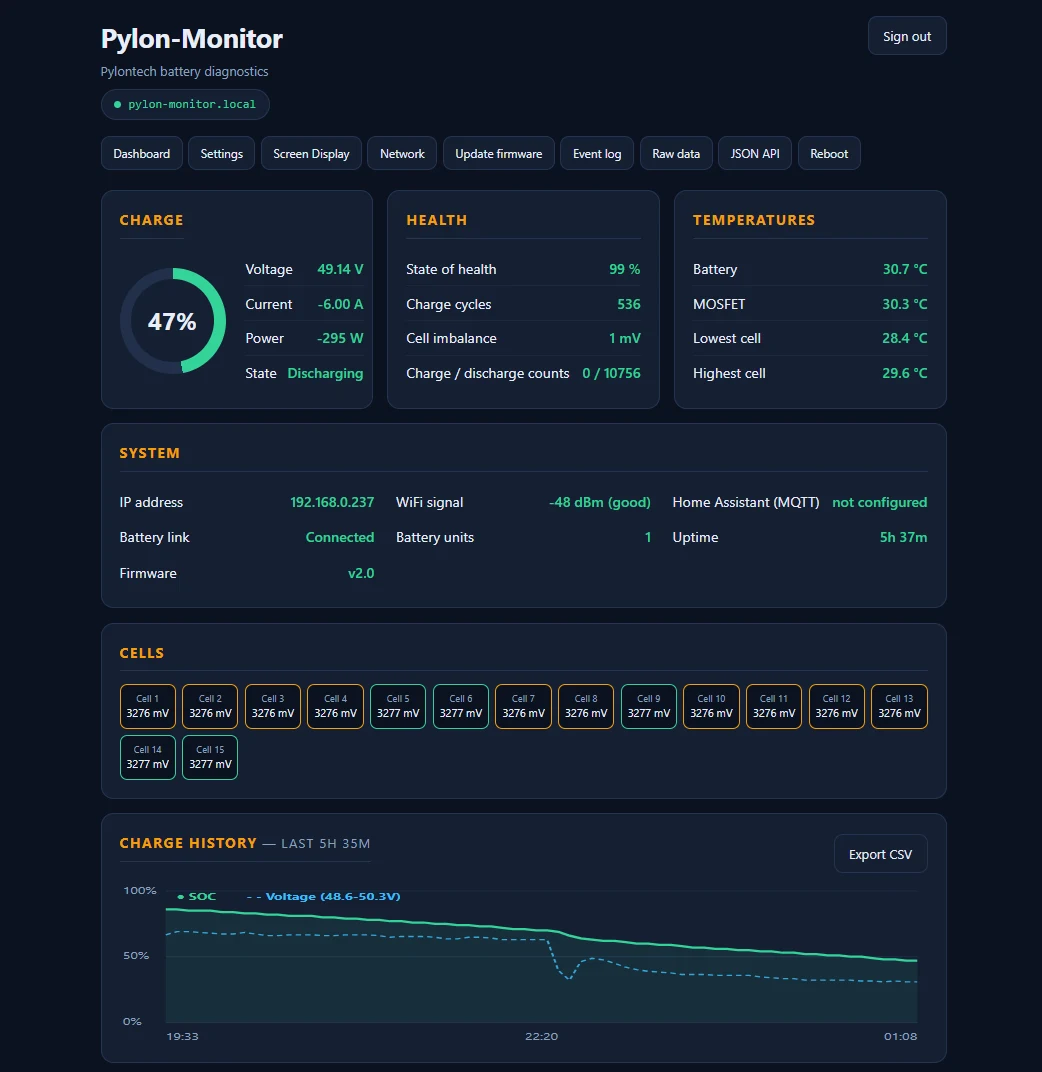
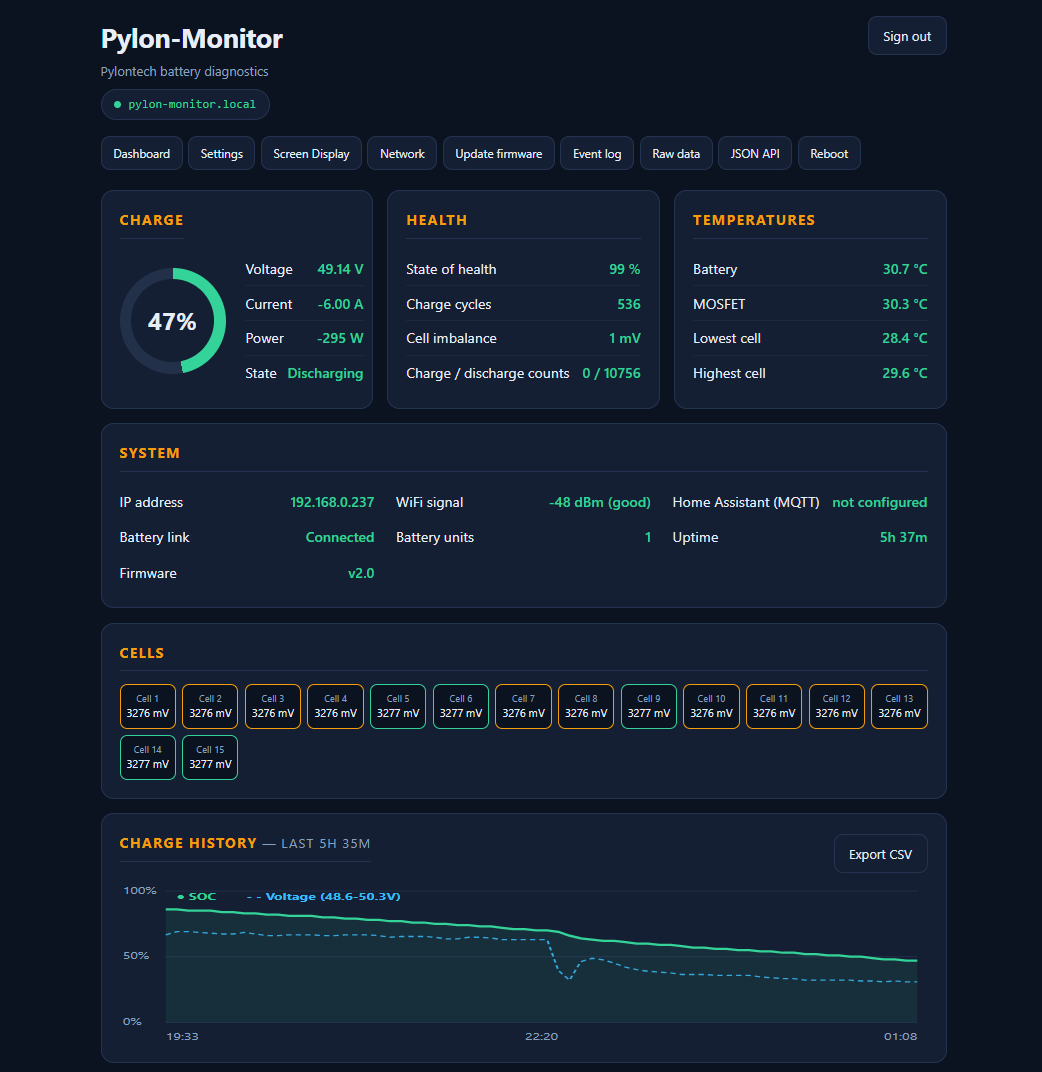
Live dashboard

Charge, health, temperatures and cells at a glance

Live dashboard
< 2 minSetup time
€59One-time price
16Batteries max, mixed models OK
0Subscriptions
0 €Cloud & 3-year history
Engineered and quality-tested in-house

Engineered end-to-end. Firmware, PCB, enclosure and assembly — all done in-house.

Pylon-Monitor isn't a rebranded factory board. We write the firmware, assemble the PCB, design the enclosure around its 1.8" IPS TFT, and quality-test every single unit before it ships.

FW

Firmware written from scratch

The WiFi captive portal, the web dashboard and the JSON API are all custom firmware we write and maintain in-house.

PCB

Custom-assembled PCB

Every board is wired, soldered and inspected — then flashed and function-tested before it goes in its case.

ENC

Purpose-built enclosure

Engineered in-house around the 1.8" IPS TFT, refined over several design revisions for a snug fit and proper heat venting.

Everything you need. Nothing you don't.

Designed for solar installers, off-grid enthusiasts and home automation users.

Best integration
Home Assistant

Home Assistant, done right

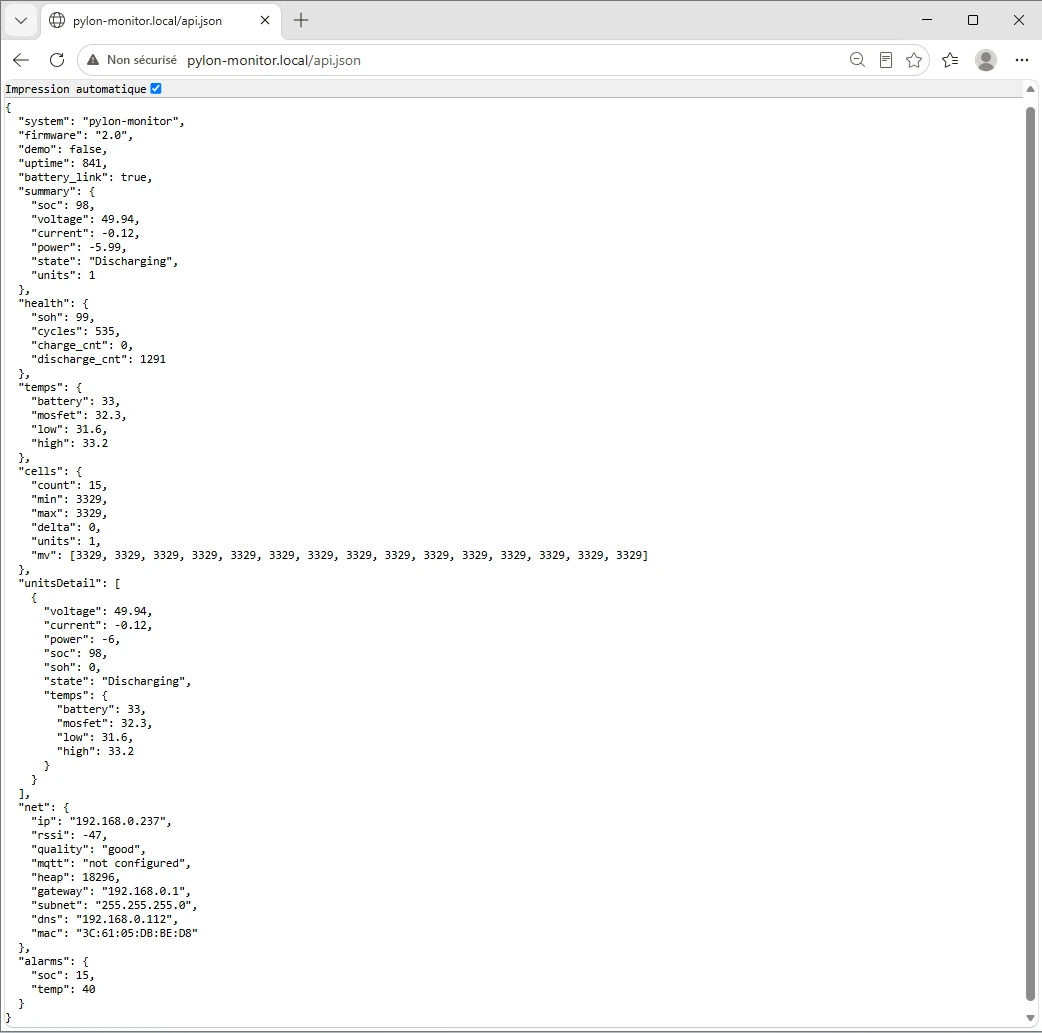
Zero-YAML MQTT auto-discovery — 10 sensors appear automatically. Prefer REST? A clean JSON API at /api.json gives you a short, auto-generated YAML paste instead.

WEB

Beautiful web dashboard

Open http://pylon-monitor.local from any phone or PC on your WiFi. No app, no account.

BAL

Smart Balance

Every full charge measured, a balance score for your pack and the weak cell named. When a balance is due, it shows the exact settings for your inverter and tracks the result cell by cell.

OTA

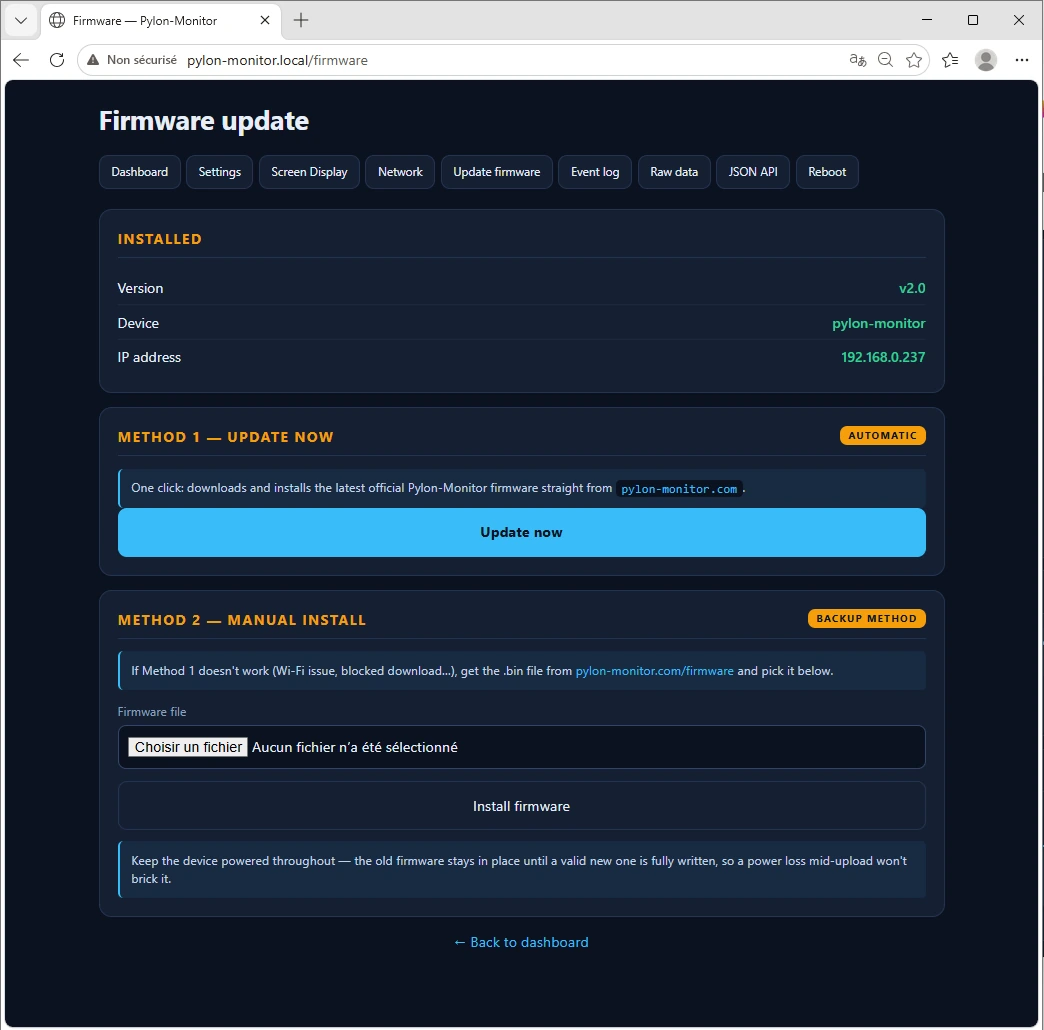
Over-the-air updates

New features arrive through a friendly web update page. No cables, no soldering, no skills required.

LAN

100% local, 100% yours

Your battery data stays on your network by default — no cloud, no telemetry, no subscription, unless you turn on the optional public link below.

URL

Check it from anywhere, if you want

Flip on a private link in Settings and pylon-monitor.com relays your JSON to a URL that works from your phone, the office, on the road — no port forwarding, no VPN. Off by default; turn it back off and the pushes stop immediately.

☁ Cloud Access · 100% Free

Cloud Access · 100% Free: your battery, live, from anywhere

Included with every Pylon-Monitor, today. No subscription, no tier, no card. Optional: your device stays fully local if you prefer — switch the Cloud on or off in its settings at any time.

  • Live dashboard from anywhereEvery battery and every cell, refreshed on their own, on your phone.
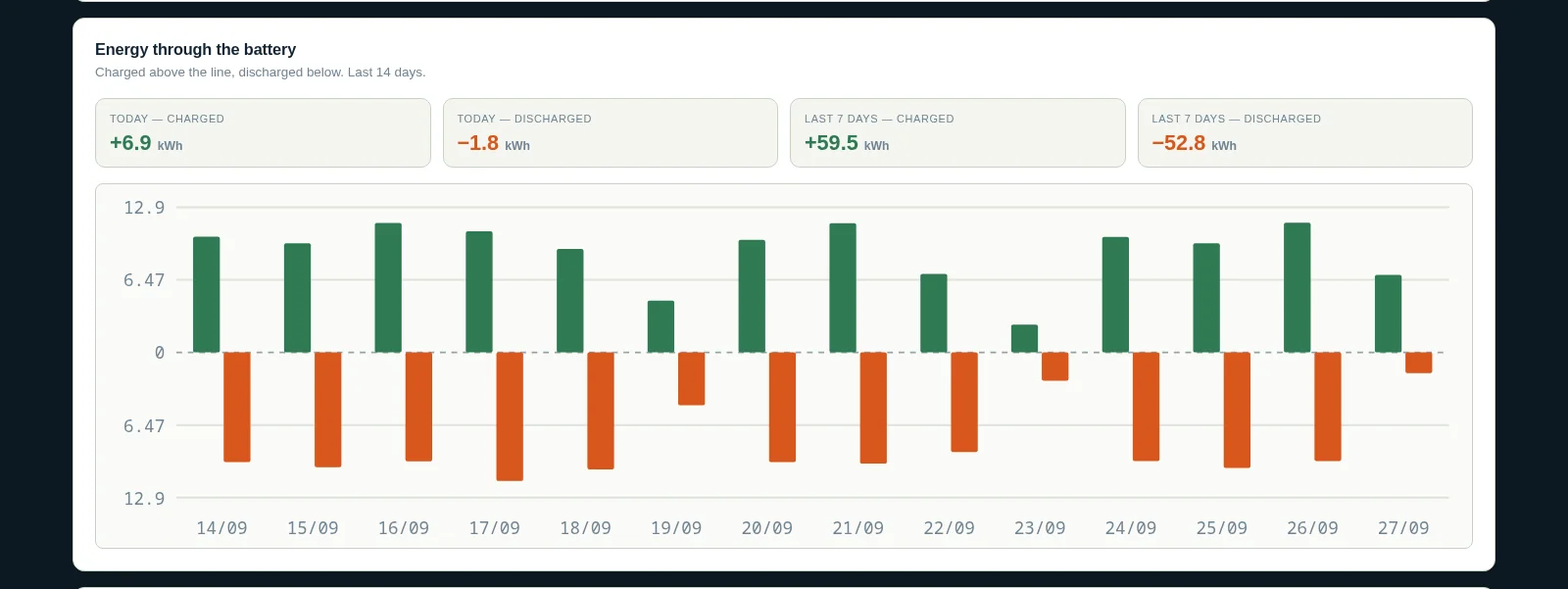
  • 3 years of historyCharge, kWh in and out, temperatures, health — day by day.
  • An email if it goes quietSix hours without news from your device and we tell you.
  • Smart BalanceA balance score, every full-charge window measured, the weak cell named — and a guided session when it is due.
  • Public JSON linkHome Assistant, Node-RED, a widget… no port forwarding, no VPN.
  • CSV exportEverything stored, per pack or per battery and per cell.
0 €per month, per year, forever
Open my Cloud dashboard →How to switch it on
pylon-monitor.com/dashboard
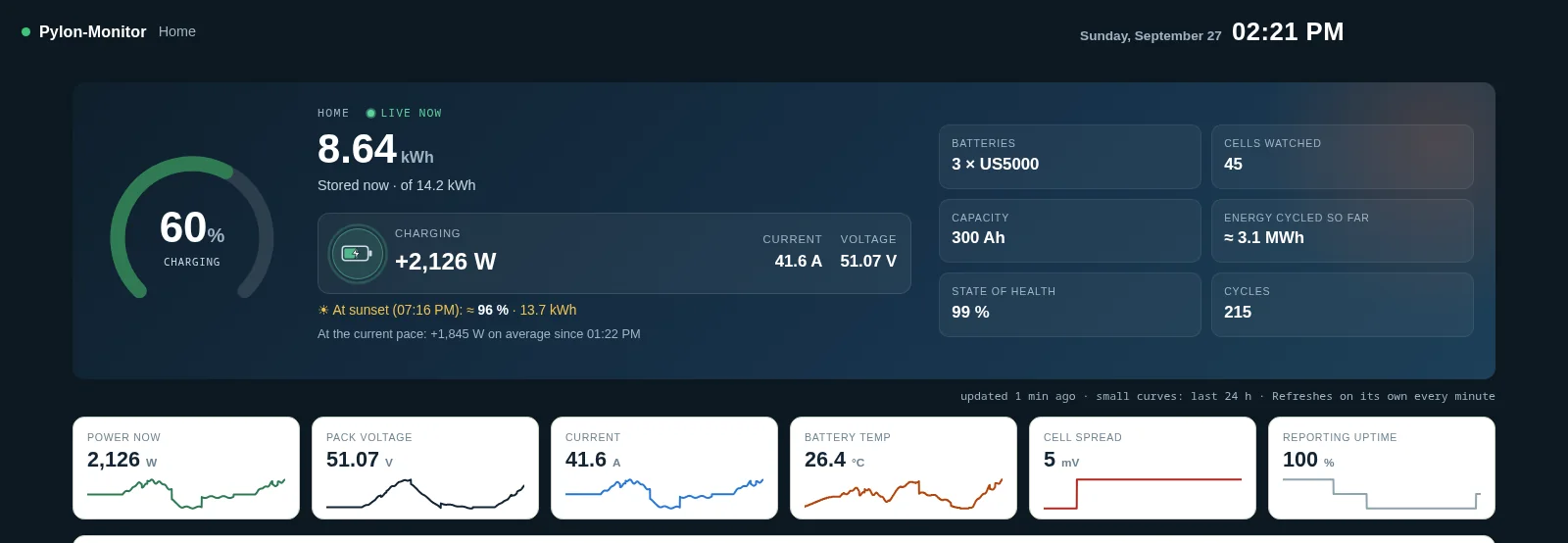
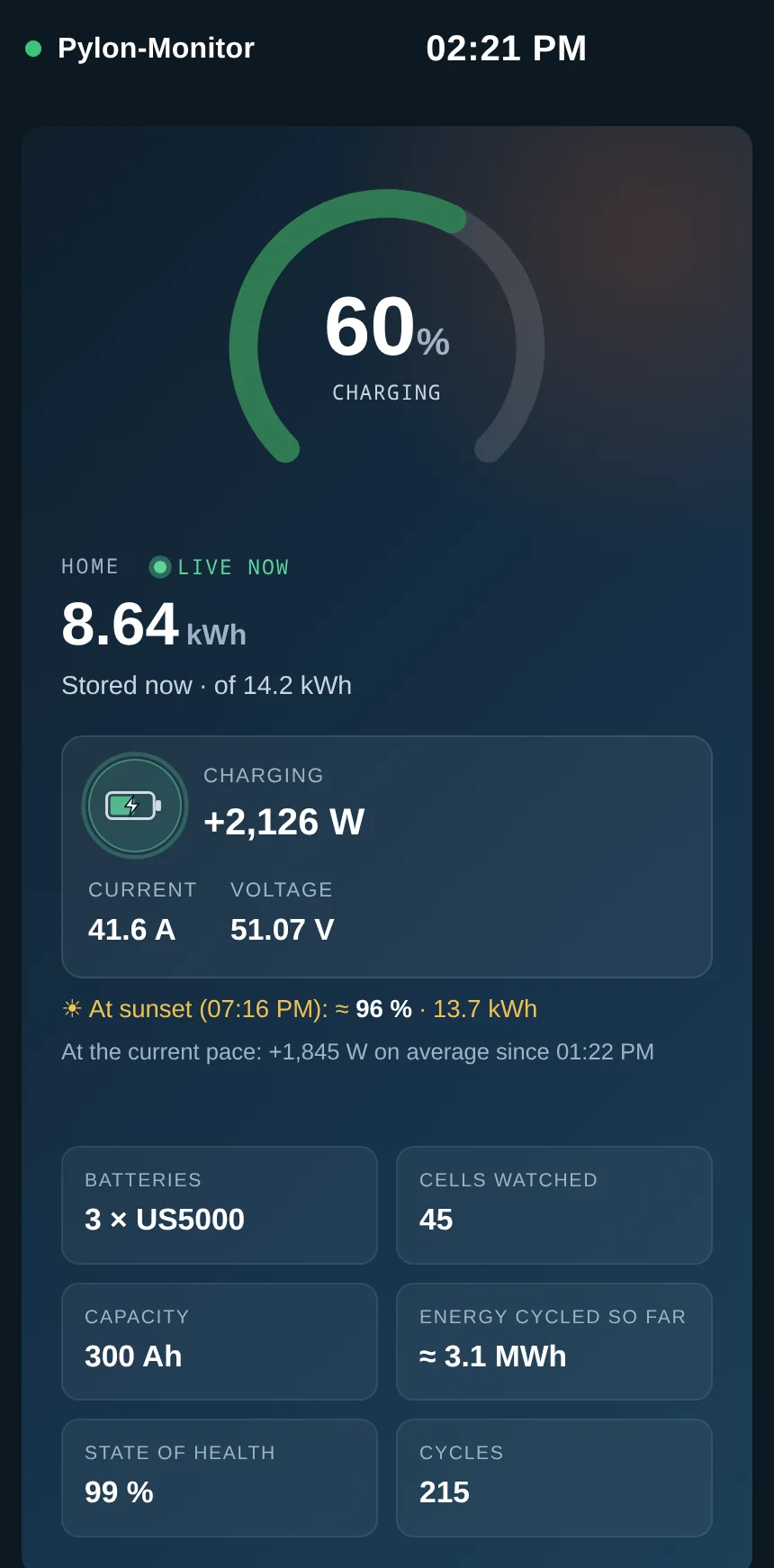
Pylon-Monitor Cloud dashboard: charge, sunset forecast, energy and every battery

It tells you what your battery is about to do

☀At sunset

How full your battery will be when the sun goes down — worked out from your own charging pace since this morning.

⚡Full at…

The time your pack will reach 100 %, updated every minute as the clouds come and go.

🌙Until sunrise

How much will be left when the sun comes back up — or when your usual grid charge kicks in.

And the rest of the page

Compatible with your Pylontech

Works with the Console (RS-232) port on every Pylontech family: the low-voltage US series, and high-voltage Force H2 / H48050 towers on the current hardware generation.

US5000
US3000C
US3000
US2000C
US2000B+
UP2500
Force-L1
Force H2 high voltage · beta
H48050 high voltage · beta

Not sure if your model is compatible? Check the FAQ or contact us.

From box to dashboard in 3 steps

1

Plug it in

Connect the included RJ45 cable from the Pylon-Monitor to your battery's Console port. Power it with any USB cable.

2

Join the setup WiFi

Open WiFi on your phone, pick PylonMonitor-Setup, then choose your home network and enter its password.

3

Open the dashboard

The TFT screen shows the device IP. Type it in your browser, create your own password, and your battery's live data appears.

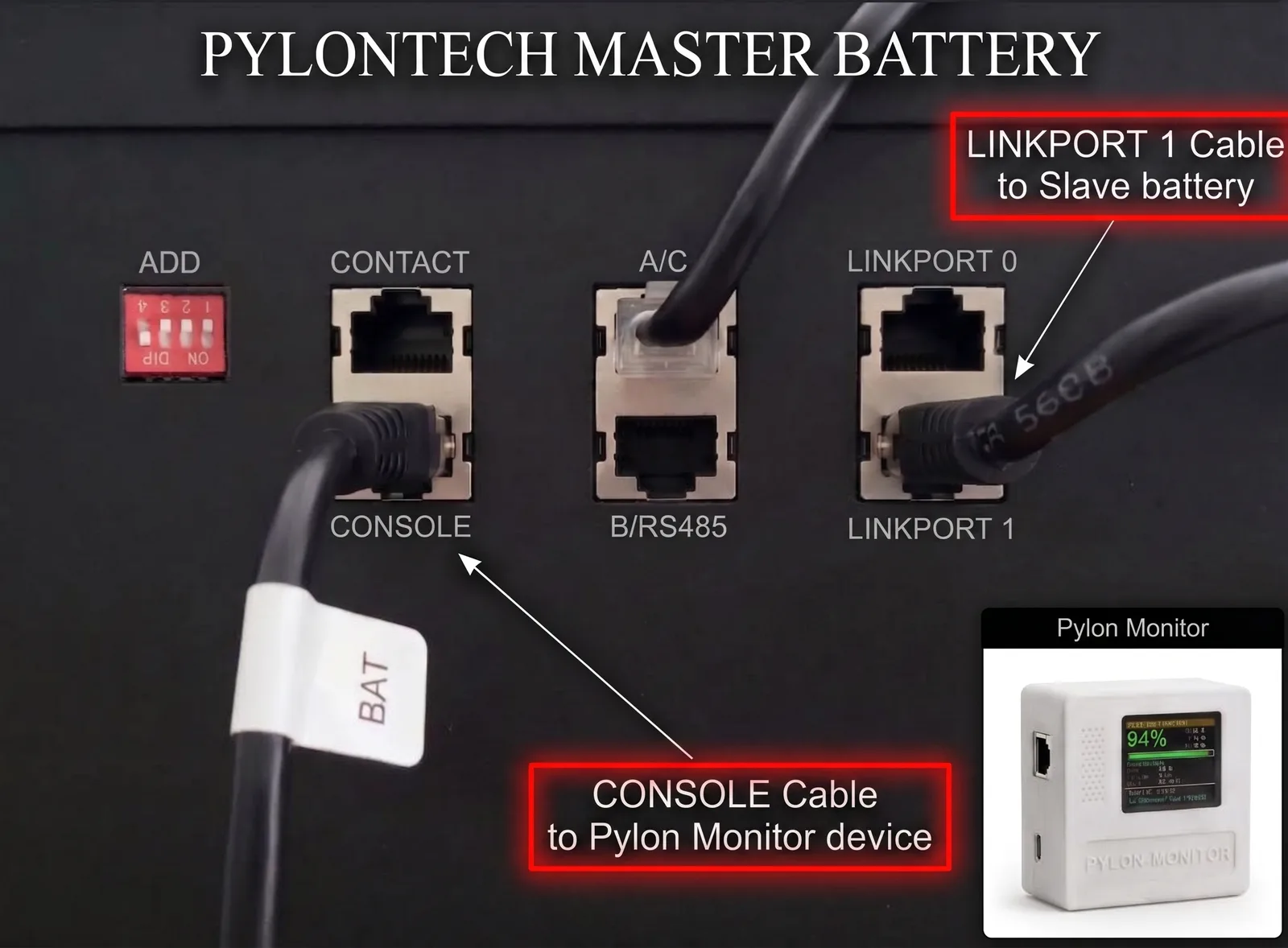
Pylontech master battery panel: the RJ45 cable in the CONSOLE port feeds the Pylon-Monitor, while the stack link cable leaves LINK PORT 1 towards the slave battery
On the master battery: CONSOLE goes to the Pylon-Monitor, LINK PORT 1 goes to the slave battery.
The mistake almost everyone makes: LINK PORT 1, not LINK PORT 0
The cable that chains your master battery to the first slave must leave LINK PORT 1 on the master — never LINK PORT 0. It plugs into LINK PORT 0 on the slave, and every further battery repeats the same 1 → 0 pattern. Wired the other way round the master never sees the rest of the stack, so Pylon-Monitor reports a single battery no matter how many you own.

A clean API your tools will love

One HTTP call returns SOC, SOH, voltage, current, power and state — ready to plug into your favourite home automation tool.

  • REST endpoint at /api.json
  • Native Home Assistant rest sensor support
  • Works with Node-RED, Jeedom, Domoticz, openHAB…
  • Dashboard refreshes live every ~4 seconds, all on your LAN
Integration guide
GET http://<DEVICE-IP>/api.json?key=<ACCESS-KEY>

{
  "system": "pylon-monitor",
  "firmware": "3.3.3",
  "summary": {
    "soc": 94,
    "voltage": 48.62,
    "current": -7.20,
    "power": -350.10,
    "state": "Discharging"
  },
  "health": {
    "soh": 96,
    "cycles": 486
  }
}

What owners say

8 customer reviews, 5 out of 5 on average.

Excellent rapport qualité/prix à 49 €. J'avais un peu d'appréhension pour l'intégration sur mon parc de 3 batteries US2000C, mais le portail WiFi captif rend la configuration enfantine, littéralement pliée en 2 minutes. Le fait de pouvoir interroger l'API JSON entièrement en local me rassure sur la pérennité du système. L'écran TFT est un vrai bonus pour le diagnostic rapide au garage. Je recommande !
Mathieu D.
I chained four US3000C batteries and this reads the master and all slaves effortlessly. I used to rely on a clunky DIY Raspberry Pi setup with cables everywhere, but this neat little box is so much cleaner and way more stable. MQTT auto-discovery worked flawlessly. Fantastic piece of hardware for the price, especially with the built-in screen.
David H.
Plug and play at its best. Setup took exactly two minutes as advertised and it pulled my US5000 data right away. Love the local approach.
Sarah W.
Einfach und lokal. Keine Cloud, kein Abo. Genau das, was ich für mein Home Assistant Setup gesucht habe.
Klaus M.
Muy buen producto. Fácil de usar y cero problemas con MQTT.
Carlos R.
Vraiment top. Reconnu instantanément dans Jeedom.
Nico
Impeccable.
Jean-Marc L.
Works perfectly!
Alex P.

Two models. Same firmware.

Same WiFi monitoring, same dashboard, same JSON API — with or without the screen. No subscriptions, ever.

With screen · Most popular
Pylon-Monitor V2

Pylon-Monitor V2

€59no VAT
  • Pylon-Monitor V2, in a compact, rugged enclosure
  • 1.8" screen — battery status at a glance, no phone needed
  • RJ45 console cable included
  • USB power cable included
  • Quick start guide — set up in under 2 minutes
  • Lifetime firmware updates, free and automatic
  • Cloud history & dashboard included — no subscription, ever
  • Responsive email support
Order now — €59

Ships from Europe · Tracked delivery · Secure payment

New · No screen
Pylon-Monitor Lite

Pylon-Monitor Lite

€49no VAT
  • Same firmware, same web dashboard, same JSON API
  • No physical screen — read everything on your phone, PC or Home Assistant
  • RJ45 console cable included
  • USB-C power cable included
  • Plug & play — set up in under 2 minutes
  • Lifetime firmware updates, free and automatic
  • Cloud history & dashboard included — no subscription, ever
  • Responsive email support
Order the Lite — €49

Ships from Europe · Tracked delivery · Secure payment

Full details, photos & FAQ →

Common questions

Does it work without internet?

Yes. The device is 100% local. It only needs your WiFi to be accessible from your phone or your Home Assistant instance. The free Cloud, for seeing it from anywhere, is optional.

Will it void my Pylontech warranty?

No. The Console port is read-only and meant for monitoring. The Pylon-Monitor never sends commands that change battery behavior.

Can I use it with multiple batteries? How many at most?

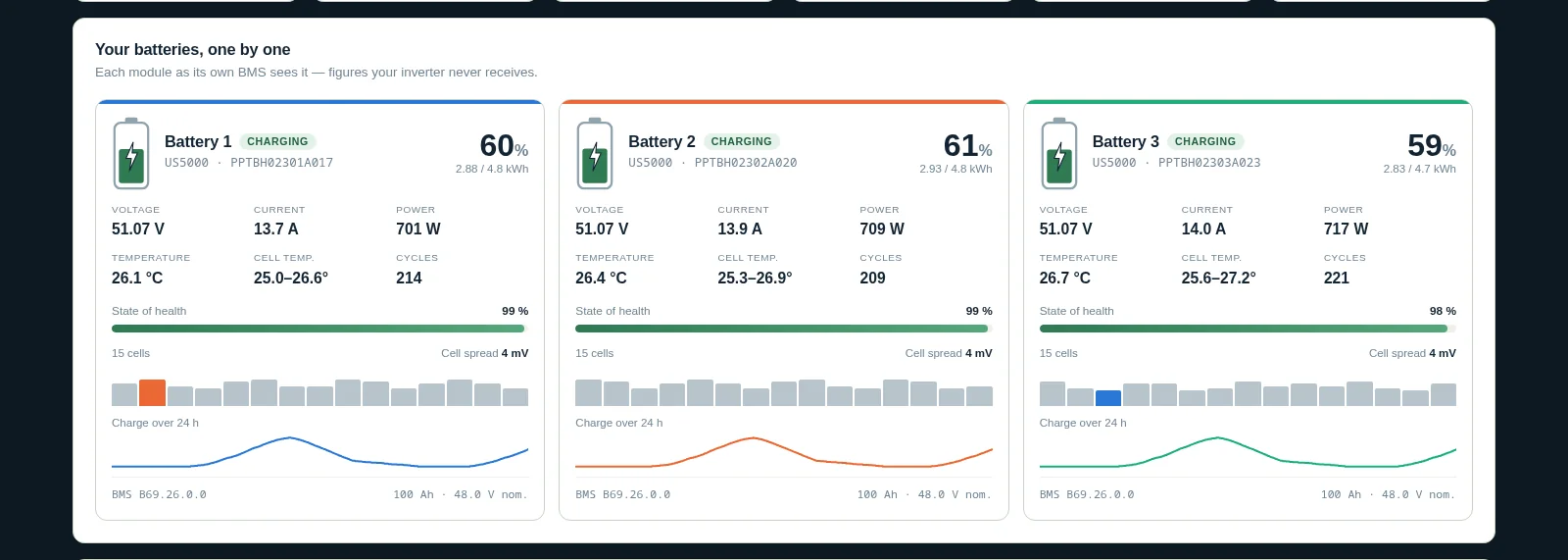
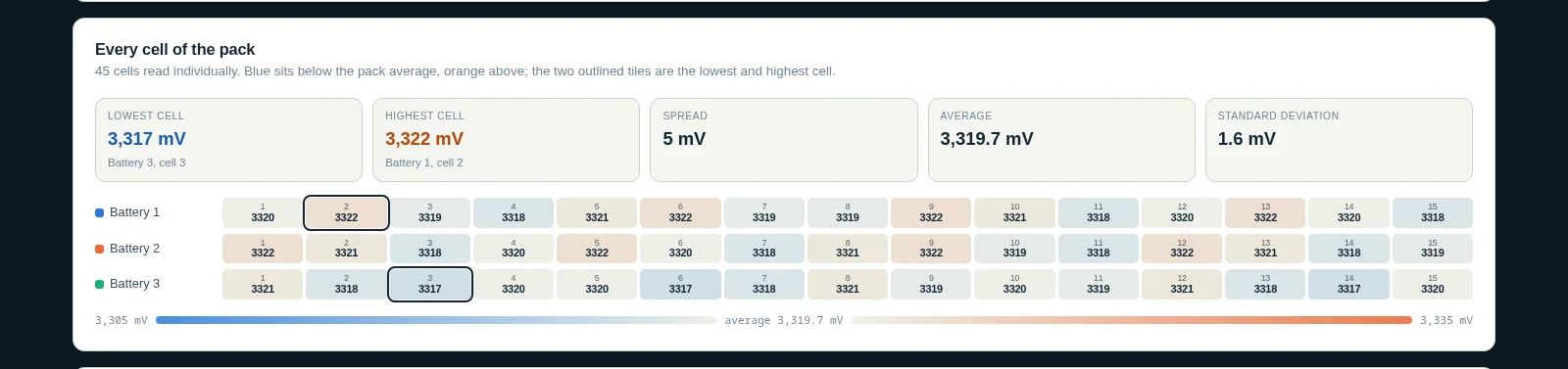
Yes — up to 16 batteries in total, chained together. For example: 16× US5000 (≈76.8 kWh), or a mix like 2× US2000 + 2× US3000 + 1× US5000. Plug into the master's Console port only and the Pylon-Monitor queries every physical battery individually, with a per-battery selector on the dashboard. Every cell of every battery is shown too, for all 16.

How do I update the firmware?

Download the free .bin file from our firmware page, open the dashboard, click Update firmware, and upload it — done in under 30 seconds, settings preserved.

How does this compare to wireless Pylontech diagnostic adapters?

The Pylon-Monitor plugs into the Console port with the included RJ45 cable and gives you a WiFi dashboard reachable from any phone, tablet or PC on your network — no USB cable permanently tied to a computer. At €59 with lifetime firmware updates and no subscription, it typically costs a fraction of wireless Pylontech diagnostic adapters on the market.

Join 6,000 Pylon-Monitor fans on Facebook

News, firmware updates, real installations and tips: follow the page and ask your questions to the community.

Follow us on Facebook