Two names, two jobs
Balancing a Pylontech comes down to two questions: do my cells need it? and how do I make it happen now? Pylon-Monitor answers each one with its own tool.
| Smart Balance | Force Balance | |
|---|---|---|
| What it does | Measures every full-charge window and scores how well your pack is balanced | Runs a balancing session on demand, from start to finish |
| When | All the time, on its own | When you start it — typically when Smart Balance recommends it |
| Your part | Nothing | Pick your inverter and apply the charge setting it shows you |
| How long | Continuous, over the last 7 days | About 2 hours at full charge, plus the time to get there |
| What you get | A balance score out of 100, a verdict, every cell mapped, the weak cell named | A before/after report, battery by battery and cell by cell, by e-mail |
What a Force Balance does inside a Pylontech
Every Pylontech US module — US2000C, US3000C, US5000 — is fifteen lithium iron phosphate cells in series, and its BMS balances them in one place only: at the very top of the charge. It bleeds the highest cells through small resistors, a few tens of milliamps at a time, until the lowest ones catch up. A pack that spends its life between 30 and 80 % never gives it that window, and the cells slowly drift apart.
A Force Balance does not leave it to chance. It forces the conditions: the pack is brought to 100 % and held there for two hours — the duration Pylontech's own support works with — so the BMS's balancing runs all the way through, on every module of the stack at once. The target is Pylontech's own: every cell within 30 mV of the others at full charge.
Smart Balance: knowing when to force a balance
A Force Balance on a pack that is already balanced does no harm, but it achieves nothing either. Smart Balance tells you when it is worth doing. Every time your pack sits at full charge, it measures the spread at the start and at the end of that window — exactly what the BMS achieved — and turns the last seven days into a balance score out of 100 and one of four verdicts:
- Balanced — at the last full charge the spread came down within 30 mV. Nothing to do.
- Balance recommended — the pack has not been fully charged for more than two weeks, so the BMS has had no chance to balance. One Force Balance fixes that.
- Under watch — the pack does reach full charge, but not for long enough for the spread to come all the way down. A longer, forced window usually finishes the job.
- Weak cell suspected — even after a long window at full, the spread stays above about 100 mV. That points to a cell that has lost capacity rather than to a balancing problem, and Smart Balance names the battery and the cell.
Next to the verdict, a colour map shows every cell of every battery at the last full charge, and a 30-day trend compares the spread at mid-charge with its peak at full — where LFP cells stop hiding their differences.
How to run a Force Balance with Pylon-Monitor
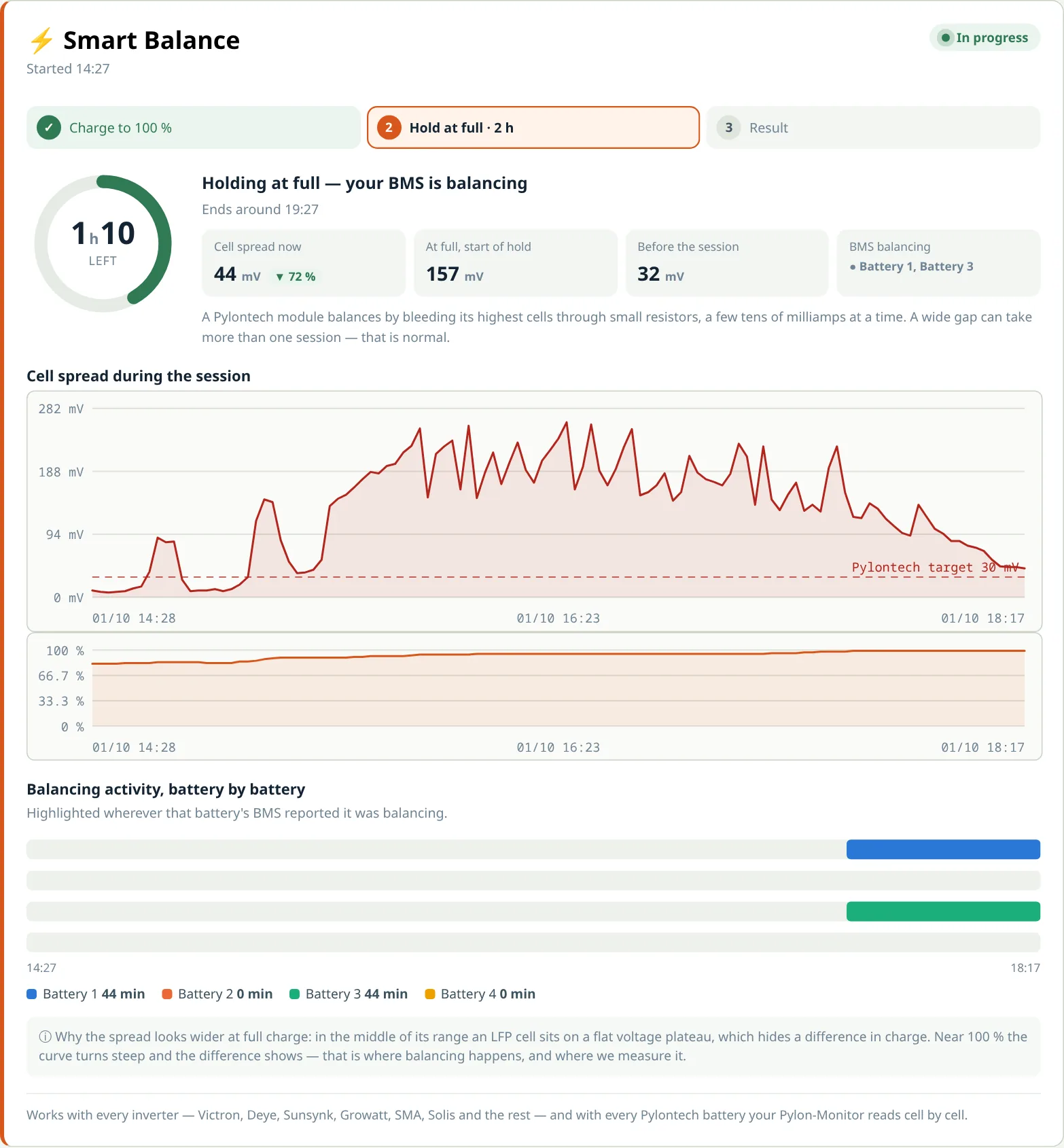
- Open your dashboard and go to the Smart Balance card. When a balance is due, the start button is right there.
- Pick your inverter — Victron, Deye, Sunsynk, Sol-Ark, Growatt, Solis, GoodWe, Sofar, ZCS Azzurro, SolaX, Fox ESS, Sungrow, LuxPower, Voltronic, Axpert, MPP Solar, EASun, Must, Studer, or any other — and press Start a guided balance.
- Apply the charge setting it shows you. The exact menu for your inverter appears on screen. Leave the charge voltage as it is: asking for 100 % is all a Force Balance needs. You also see when the pack will be full at the current rate, and whether the sun alone will get it there today.
- The two-hour hold starts by itself the moment the pack reaches 98 %. If it falls back under 95 %, the countdown restarts and you are told why.
- Follow it live — or don't. The cell spread against the 30 mV target, the state of charge and a timeline of which battery is balancing update as it goes. You can close the page: the result arrives by e-mail.
- Put your inverter back to its usual settings once the report is in.
The menus for each inverter, step by step, are also in our cell balancing guide.
Reading the Force Balance report
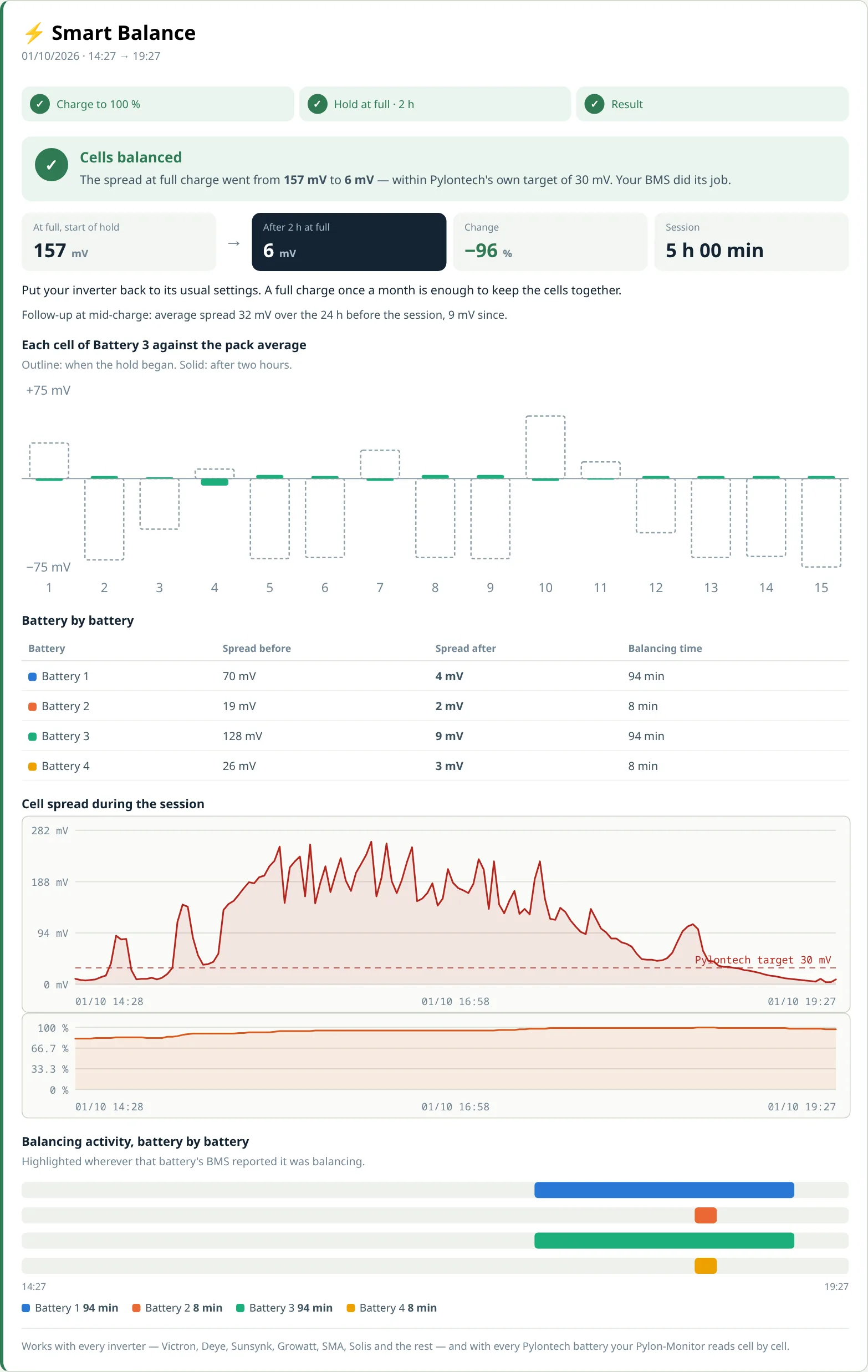
The report compares the spread at full charge at the start of the hold with the last fifteen minutes, battery by battery and cell by cell. Always at full charge, never mid-charge: in the middle of its range an LFP cell sits on a flat voltage plateau that hides almost every difference. It ends with one of three outcomes:
- Cells balanced — within 30 mV. Your BMS did its job.
- Good progress — the gap narrowed by at least a quarter but is not closed yet. The BMS works a few tens of milliamps at a time; a second Force Balance a few days later closes the rest.
- One cell stays behind — with the battery, the cell number, its distance from the average and the serial number to give your installer.
If the pack does not reach full charge within 48 hours, the session stops cleanly and tells you what to check — most often an inverter set to stop at 90 or 95 %.
How often should you force a balance?
A pack that reaches 100 % regularly balances by itself: Smart Balance shows it as balanced and you never need to force anything. If yours rarely gets above 80–90 %, one Force Balance a month keeps the cells together, and Smart Balance switches to balance recommended when the time comes. A single module that has drifted very far — well beyond 200 mV — is a case for Pylontech's service procedure, described in our cell balancing guide; the diagnostics guide covers the other readings worth watching alongside.
Frequently asked questions
- What is a Force Balance on a Pylontech battery?
- A deliberate balancing session: the pack is brought to 100 % and held at full charge for about two hours, so the BMS can bring every cell within 30 mV of the others. With Pylon-Monitor you start it from the Smart Balance card on your dashboard, and it is followed through to a before/after report.
- What is the difference between Smart Balance and Force Balance?
- Smart Balance measures continuously: it scores your pack's balance after every full charge and tells you whether a balance is needed. Force Balance is the session that does it, on demand. Smart Balance says when; Force Balance does it.
- Does Force Balance work with my inverter?
- Yes. The dashboard shows the exact settings for Victron, Deye, Sunsynk, Growatt, Solis, GoodWe, Sofar, SolaX, Fox ESS, Sungrow, LuxPower, Voltronic, Must and Studer, and a generic setting for any other inverter that can charge the battery to 100 %, from solar or from the grid.
- How long does a Force Balance take?
- Two hours at full charge, plus the time it takes to reach 98 %. The countdown starts by itself and restarts if the pack falls under 95 %. A wide gap can need a second session a few days later.
- Is a Force Balance safe for my battery?
- Yes. It asks for nothing more than a full charge at your usual charge voltage — the condition the Pylontech BMS was designed to balance in — and the BMS keeps protecting every cell throughout. You can stop the session at any time.
- Which Pylontech batteries does it work with?
- Every Pylontech battery your Pylon-Monitor reads cell by cell, including the US2000C, US3000C and US5000, alone or in a multi-battery stack — the whole stack is balanced in the same session.
Smart Balance and Force Balance are included with every Pylon-Monitor, on the free online dashboard — every cell of every battery, live.
Order now — €59 One-off purchase, 59 € all in — no VAT, no subscription.