What "cell balancing" means on a Pylontech
Every Pylontech US module — US2000C, US3000C, US5000 — is fifteen lithium iron phosphate cells in series. The battery management system (BMS) protects all fifteen at once, which has a consequence most owners never hear about: the pack is only as good as its most extreme cell. Charging stops when the first cell is full; discharging stops when the first cell is empty. If one cell sits 5 % higher than the others, the whole module loses that 5 % of usable capacity — and it is that cell that trips the over-voltage warnings at the top of the charge.
Balancing is how the BMS brings the cells back level. "Cell spread" (or "cell imbalance", "delta") is the measurement: the voltage gap between the highest and the lowest cell, in millivolts.
Why cells drift apart — and why it is usually nobody's fault
No two cells are perfectly identical. Tiny differences in self-discharge and capacity add up, cycle after cycle. The BMS corrects them, but only in one place: near the very top of the charge. A Pylontech balances passively, by bleeding its highest cells through small resistors, a few tens of milliamps at a time, once the pack is close to full.
A solar installation, by design, often lives between 30 and 80 %. Days go by, sometimes whole winter months, without the pack ever reaching the top. The BMS never gets its window, and the cells slowly drift. Nothing is broken; the battery simply has not been given the conditions it needs.
Reading the spread correctly
One detail fools almost everyone. In the middle of its range an LFP cell sits on an extremely flat voltage plateau: two cells several amp-hours apart read almost the same voltage at 50 %. Near 100 % the curve turns steep and the difference suddenly shows. So a pack can look perfect at mid-charge and show 150 mV at full — that is not a sudden fault, that is the imbalance becoming visible.
| Where you read it | Healthy | Worth acting on |
|---|---|---|
| At rest, mid-charge | Under ~15 mV | Several times this pack's usual value, or a sustained 100 mV |
| At full charge, after balancing | Under 30 mV — Pylontech's own target | Still above ~100 mV after two hours at full |
| During a strong charge | Wider than at rest — normal | Judge it on a 24-hour average, never on one reading |
To put numbers on it: across the Pylontech packs reporting to Pylon-Monitor Cloud, most average between 1 and 11 mV over a week. A handful average above 100 mV — and they are, almost without exception, packs that rarely see 100 %.
How to balance a Pylontech: the two-hour rule
The fix is the same for every Pylontech US pack: bring it to 100 % and keep it there for about two hours. That is the window in which the BMS does its work. Ask your inverter for a full charge — from solar if the day allows it, from the grid otherwise. Leave the charge voltage alone: asking for 100 % is enough.
Victron
- On your GX device (Cerbo, Venus) or in VRM: Settings → ESS → Mode → Keep batteries charged.
- It fills the pack from solar first, then from the grid if needed.
- When the result appears here, set the mode back to Optimized.
Deye · Sunsynk · Sol-Ark
- Open System Setup → Time Of Use.
- On the slot covering the next few hours, tick Grid charge and set its SOC to 100 %.
- When the result appears here, put your usual slot back.
Growatt
- In the Growatt app or on ShineServer, add a Battery First period covering the next few hours.
- Set its stop SOC to 100 %, with AC charge enabled if the sun will not be enough.
- When the result appears here, remove that period.
Solis
- On the inverter: Advanced Settings → Storage Energy Set → Storage Mode Select → Self-Use, then switch Time of Use on.
- Set a charge slot covering the next few hours, and allow grid charging if the sun will not be enough.
- When the result appears here, switch Time of Use back off.
GoodWe
- In the SolarGo app: Working mode → Economic mode, then add a charge slot covering the next few hours.
- Let it charge up to 100 %, from the grid if the sun will not be enough.
- When the result appears here, set your usual working mode back.
Sofar · ZCS Azzurro
- On the inverter, open Basic Settings → Energy Storage Mode and choose Timing mode (or Time-of-use).
- Set a charge period covering the next few hours, with a charge power your grid connection can supply.
- When the result appears here, set your usual mode back (usually Auto).
SolaX
- In the inverter menu or the SolaX Cloud app, open the Charger period settings and set period 1 to the next few hours.
- Enable charge from grid and set the target to 100 %.
- When the result appears here, put your usual charge period back.
Fox ESS
- In the FoxCloud app or on the inverter: Work mode → Force charge, and enable a period covering the next few hours.
- Set the charge limit (Max SoC) to 100 %.
- When the result appears here, switch the force-charge period off.
Sungrow
- In the iSolarCloud app: Energy management → Forced charging, enabled for the next few hours.
- Set the target SOC to 100 %.
- When the result appears here, switch forced charging off.
LuxPower
- In the LuxPower monitor or on the inverter, enable AC Charge with a time slot covering the next few hours.
- Set the AC Charge stop SOC to 100 %.
- When the result appears here, set AC Charge back to your usual setting.
Voltronic · Axpert · MPP Solar · EASun
- In the settings menu, set program 16 — charger source priority to SNU (solar and utility together).
- Leave the battery type as it is (PYL, BMS communication).
- When the result appears here, set program 16 back to your usual value (OSO or CSO).
Must
- In the settings menu, set the charger source priority to solar and utility.
- Leave the battery type on its Pylontech / BMS setting.
- When the result appears here, set the charger source priority back to your usual value.
Studer
- Make sure the AC input (grid or generator) is connected and allowed to charge the battery.
- Start a new charge cycle from the RCC remote or the Xcom portal: the battery's BMS takes it to full.
- Nothing to put back afterwards.
Other inverter
- Look for a setting called grid charge, force charge or charge target SOC.
- Set it to 100 % for the next few hours — or simply start on a sunny morning if your panels can fill the pack.
- When the result appears here, put your usual settings back.
If your installation rarely reaches full charge, once a month keeps the cells together.
Severe imbalance: the service procedure
For a module that has drifted very far — typically more than 200 mV — Pylontech's service procedure is a staged DC charge with an external charger, done by an installer: around 51 V at 5 A until the current falls, then 52.5 V at 2 A, then a long finish at 52.5 V and only 0.3 A, until every cell is within 30 mV. It takes four to twelve hours. It is the heavy option, and most packs never need it: regular full charges do the same job before the gap gets that wide.
Smart Balance: the whole session, run for you
Knowing the rule is one thing; doing it right is another. When does the two hours actually start? Did the pack fall back to 94 % halfway through? Did it work? Smart Balance, on your Pylon-Monitor dashboard, takes care of all of it.
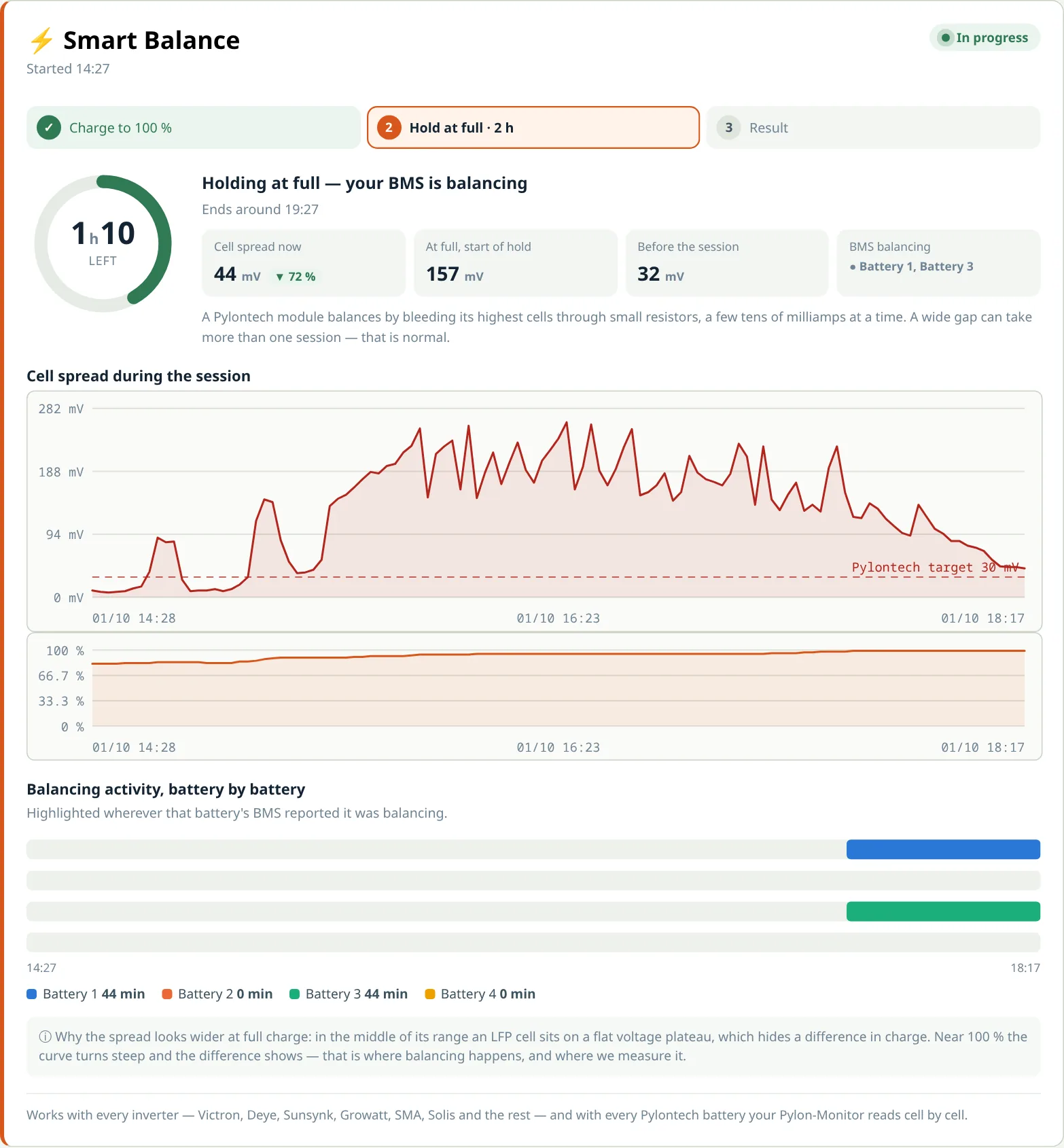
- Pick your inverter and start. Smart Balance shows you exactly what to set — the same steps as above — and when the pack will be full at the current rate, including whether the sun alone will get there today.
- The two-hour window opens by itself the moment the pack reaches 98 %. If it falls back under 95 %, the countdown restarts and you are told why.
- Everything is live: cell spread against Pylontech's 30 mV target, state of charge, and a timeline of which battery's BMS is balancing.
- You get the result by e-mail — no need to keep the page open.
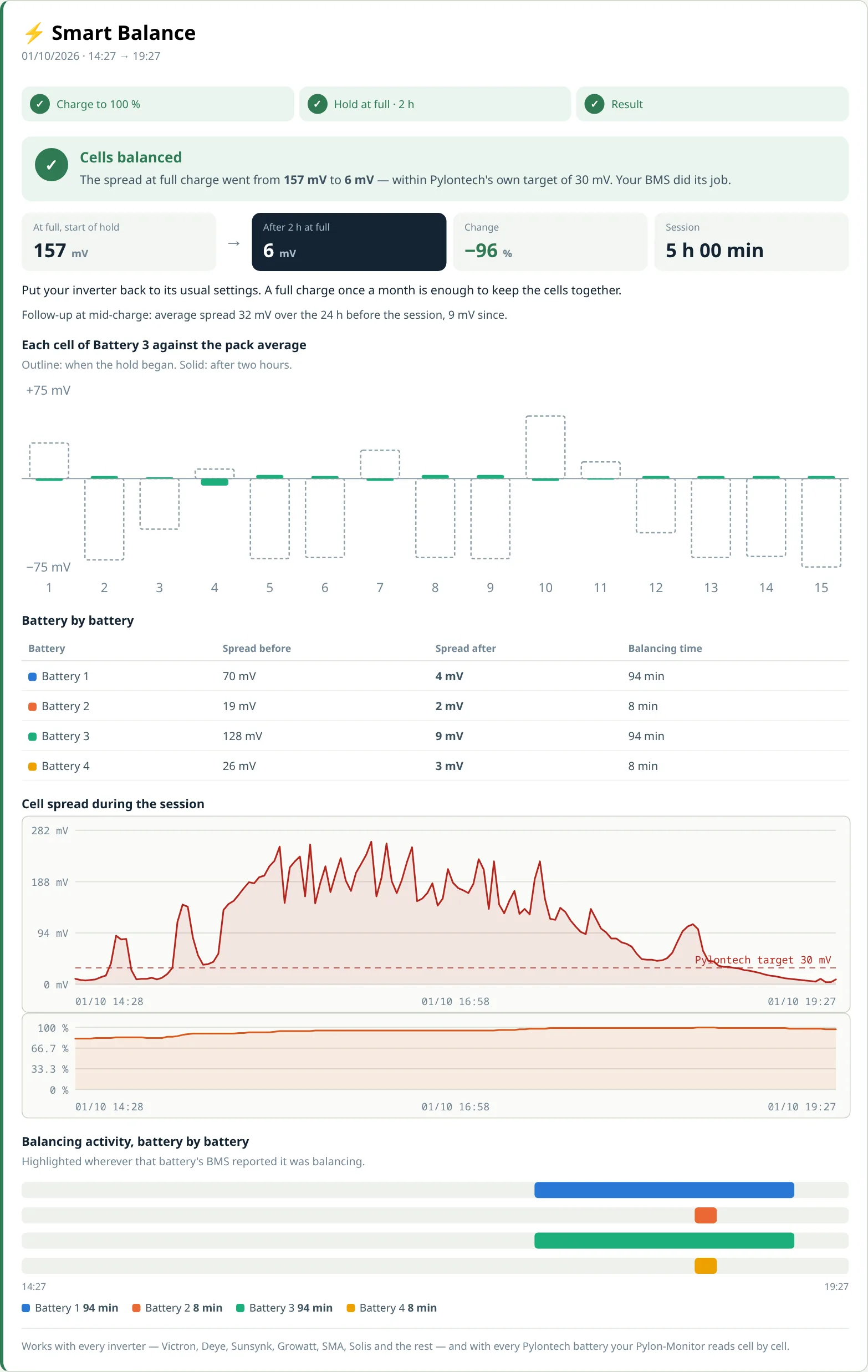
The report compares the spread at full charge at the start of the window with the last fifteen minutes, battery by battery and cell by cell, and gives one of three verdicts: balanced, good progress (large gaps can take more than one session), or one cell stays behind — with the battery, the cell number and the serial number to give your installer.
When balancing is not the answer
Balancing corrects a difference in charge. It cannot fix a cell that has lost capacity. The signature is unmistakable once you know it: the pack reaches full charge regularly, the two-hour window happens, and one cell still sits far from the others — always the same one. On one pack we followed, the spread stayed at 282 mV after two full hours, and the whole gap came from a single cell 189 mV below the average. That is not a missed balancing window; that is a module to show your installer.
Nothing is urgent in that case — the battery keeps working, the BMS keeps protecting it. But it is exactly the information that turns a vague "my battery seems weaker" into a precise warranty conversation. Our diagnostics guide explains the other readings worth watching alongside it, and the alarm codes guide what each warning means.
Frequently asked questions
- Does Pylon-Monitor balance Pylontech cells?
- Pylon-Monitor runs the whole balancing session with you. Smart Balance tells you exactly what to set on your inverter, opens the two-hour balancing window by itself when the pack reaches 98 %, follows every cell live and e-mails you a before/after report, down to the cell that needs attention. The balancing itself happens inside the Pylontech, through its own BMS, exactly as the manufacturer designed it.
- How often should I balance my Pylontech battery?
- A pack that reaches 100 % regularly balances by itself and needs nothing. If your installation rarely gets above 80–90 %, one full charge held for about two hours each month is enough to keep the cells together.
- Can I balance with solar only, without grid charging?
- Yes, on a day sunny enough to fill the pack and keep it full for two hours. Smart Balance tells you during the session whether the sun alone will get the pack to full today, at the current rate.
- Why does my cell spread jump while charging?
- Because LFP cells hide their differences in the middle of their range and reveal them near 100 %. A spread that widens at the top of the charge is usually an imbalance becoming visible, not a new fault. Judge it on a 24-hour average or at full charge, never on a single reading.
- What cell spread is normal for a Pylontech?
- At rest and mid-charge, under about 15 mV is healthy. At full charge after balancing, Pylontech's own target is 30 mV or less. A spread that stays above about 100 mV after two hours at full charge points to a weaker cell.
- What if one cell stays behind after balancing?
- Run one more session a few days later. If the same cell still sits far from the others after a full two-hour window, it has most likely lost capacity. Smart Balance names the battery, the cell and its serial number, which is exactly what your installer needs for a warranty discussion.
Every cell of every battery, live — and Smart Balance to bring them back in line, step by step, with a before/after report.
Order now — €59 One-off purchase, 59 € all in — no VAT, no subscription.