The numbers your battery has been telling you all along
A Pylontech battery's BMS tracks far more about itself than most owners ever see. Every time PYLON Console connects, or every time a monitoring device polls the Console port, the same handful of numbers come back: state of charge, state of health, per-cell voltages, cycle count, temperatures. What's missing for most people isn't the data — it's knowing which of these numbers are worth a second look, and which are just background noise.
This is the reference we wish existed when we started building Pylontech diagnostics tooling: plain-English, no BMS engineering degree required.
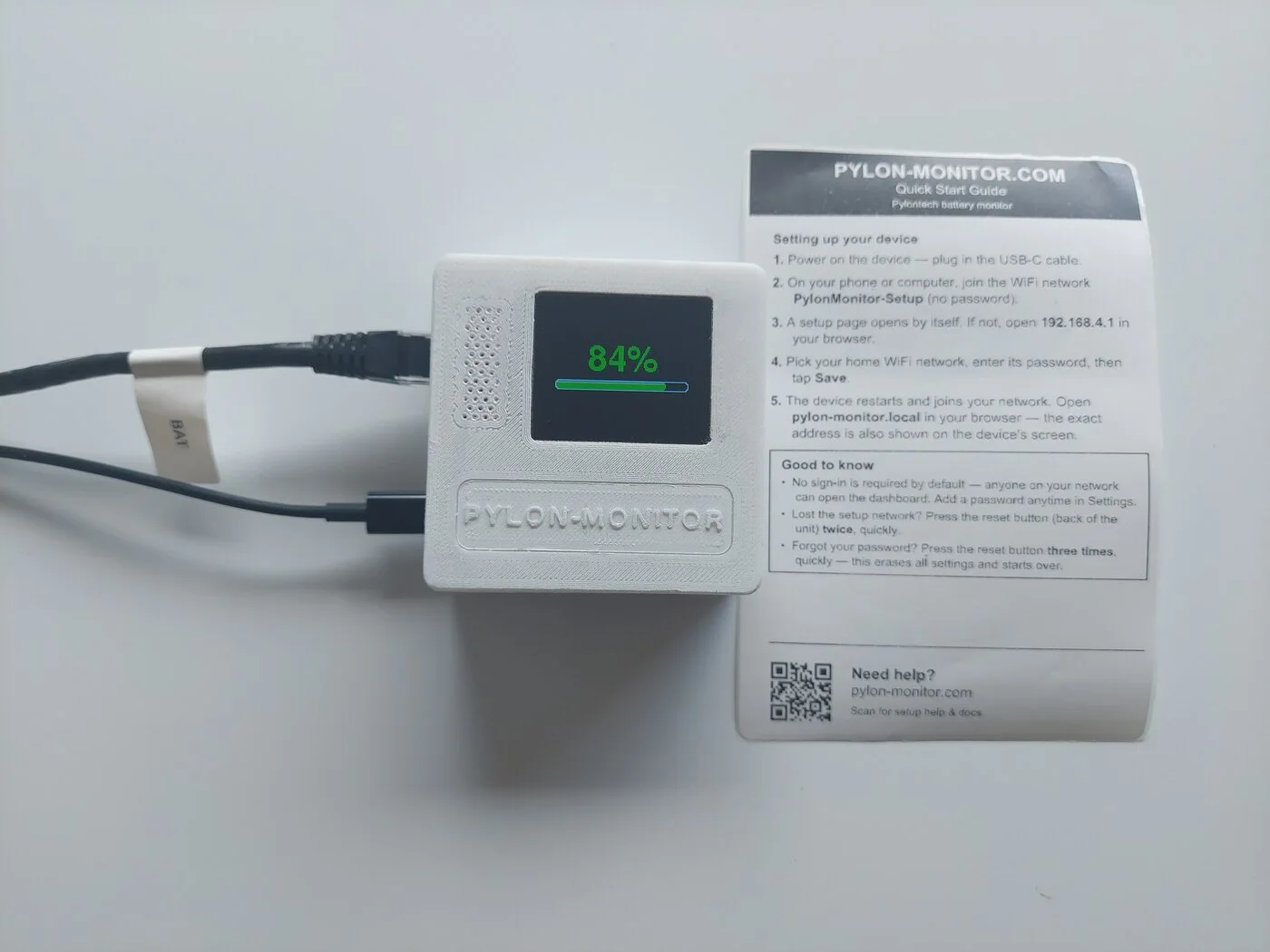
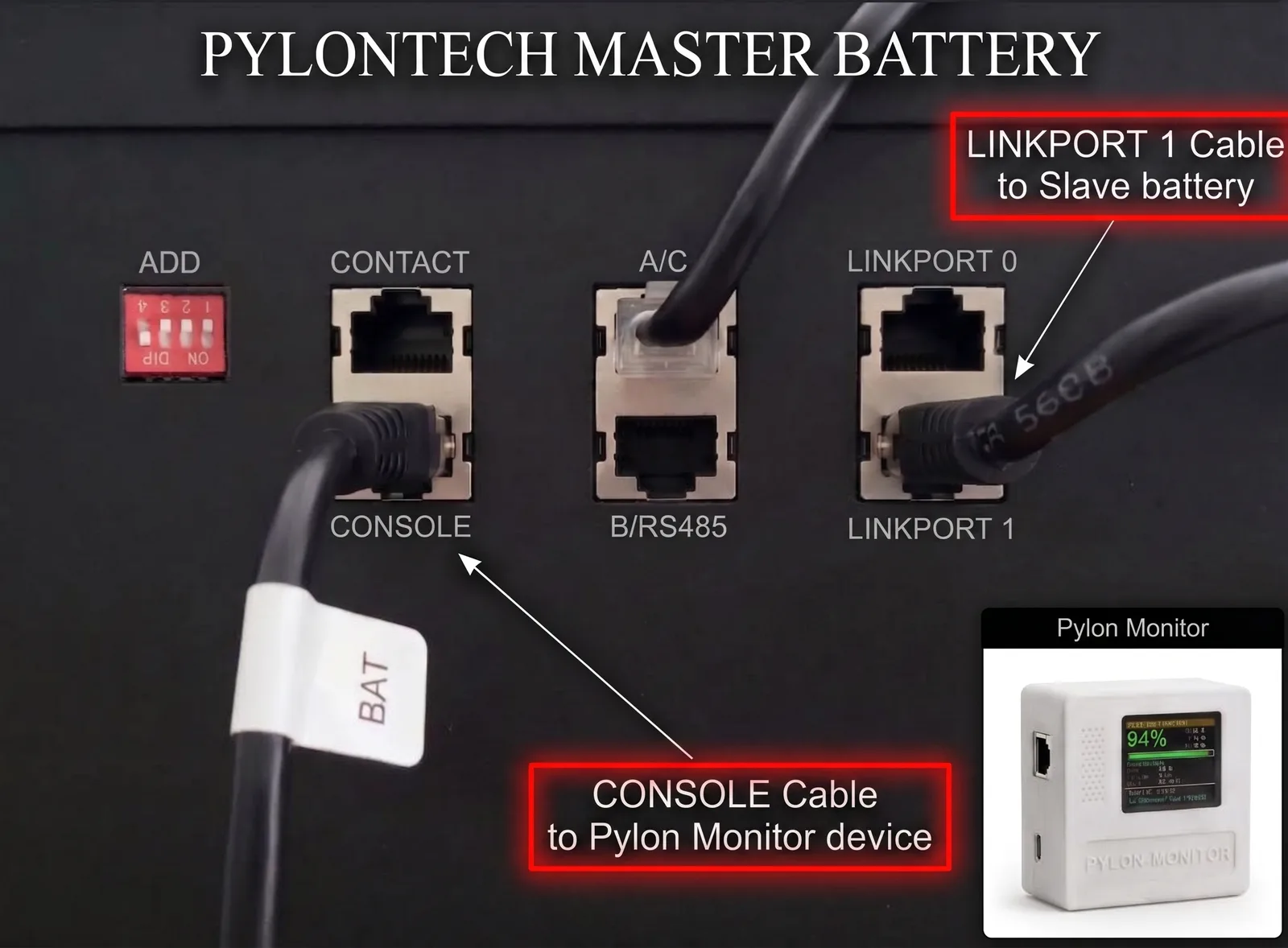
The cable that chains your master battery to the first slave must leave LINK PORT 1 on the master — never LINK PORT 0. It plugs into LINK PORT 0 on the slave, and every further battery repeats the same 1 → 0 pattern. Wired the other way round the master never sees the rest of the stack, so Pylon-Monitor reports a single battery no matter how many you own.
SOC — the number everyone looks at (and what it doesn't tell you)
State of Charge is simply how full the battery is right now, as a percentage. It's the number on every screen, every app, every dashboard — and it's also the least useful number for judging whether the battery itself is healthy. A battery can swing from 100% to 10% and back every single day for ten years and SOC alone won't tell you whether it's aging gracefully or falling apart. SOC answers "can I use my battery right now" — nothing more.
SOH — the number that actually matters long-term
State of Health is the one worth tracking over months, not minutes: it's the battery's remaining capacity compared to when it was new, also as a percentage. A battery reporting 98% SOH after a year of daily cycling is aging exactly as expected. A battery that's dropped to 85% in the same period is degrading faster than normal — not necessarily an emergency, but worth a closer look, and worth comparing against what similar systems typically show at that cycle count.
The practical habit worth building: don't just glance at SOH, log it. A single reading tells you almost nothing; a trend over six months tells you everything. This is exactly the kind of thing a permanent monitoring setup catches and a once-a-year laptop check misses entirely — see our guide to what Pylontech monitoring should actually look like if you're not there yet.
Cell imbalance — the quiet early-warning signal
Inside every Pylontech unit, several individual cells are wired together, and the BMS actively works to keep their voltages in step. Cell imbalance — the spread between the highest and lowest cell voltage — is usually a small, boring number that sits near zero and stays there. It's also one of the earliest tells that something is starting to go wrong with a specific cell, well before SOH itself moves noticeably.
Almost nobody checks this manually, because almost nobody has a screen showing it continuously. That's the whole argument for a dashboard that surfaces it automatically instead of a number buried three menus deep in vendor software you only open once a year.
Cycles, temperature, and the alarm-worthy numbers
- Charge cycles — mostly a reference point, useful for comparing against the manufacturer's rated cycle life, not something that needs a real-time alert.
- Battery & MOSFET temperature — boring 99% of the time, which is exactly why it deserves a threshold alarm rather than a glance: the moment it isn't boring, you want to know immediately, not on your next visit.
- Voltage & current — less about health, more about behaviour: confirms the battery is charging or discharging the way you expect, and at roughly the rate you expect.
A rough field guide to what's normal
| Signal | Usually fine | Worth a closer look |
|---|---|---|
| SOH (1 year in) | 95–100% | Below ~90% unusually early |
| Cell imbalance | A few mV, stable | Steadily climbing over weeks |
| Battery temperature | Within manufacturer's normal range | Repeated alarm threshold crossings |
| SOC swings | Follows your usage pattern | Unexplained sudden drops with no matching load |
These are general orientation points, not a diagnosis — always weigh them against your specific system, usage pattern and the manufacturer's own documentation. A monitoring tool's job is to put the numbers in front of you reliably; interpreting a genuinely borderline case is still worth a second opinion from an installer familiar with your setup.
Turning numbers into alerts, not just a screen to check
Reading this far means you now know which numbers matter. The next step is making sure you see them without having to remember to look — a configurable alarm (SOC and temperature thresholds, with hysteresis so one noisy reading doesn't spam you) pushed straight to your phone, or the same data flowing into Home Assistant where a slow SOH trend shows up on a history graph automatically. See the full feature list for how this is built into Pylon-Monitor, or every other platform it plugs into if Home Assistant isn't your stack.
Frequently asked questions
- What's the difference between Pylontech SOC and SOH?
- SOC (State of Charge) is how full the battery is right now, in %. SOH (State of Health) is how much capacity remains compared to when the battery was new, also in %. SOC changes constantly with use; SOH changes slowly over months and years as the battery ages.
- What is a normal SOH for a Pylontech battery after one year?
- Typically 95–100% after a year of normal daily cycling. Dropping notably below roughly 90% unusually early is worth a closer look, though the exact figure depends on cycling pattern and conditions.
- What does Pylontech cell imbalance mean?
- It's the voltage difference between the highest and lowest individual cell inside the battery. A small, stable value is normal — the BMS actively balances cells. A steadily climbing imbalance over weeks is an early sign a specific cell may be starting to degrade.
Pylon-Monitor surfaces every one of these numbers automatically — live on a dashboard, logged for trends, with configurable alarms on the ones that matter.
Order now — €59 One-time purchase, €59 total — no VAT, no subscription.