Where the firmware version lives
Every Pylontech US module (US2000C, US3000C, US5000) has its own BMS, a small computer that measures the fifteen cells, protects them and talks to the other batteries. Its software has a version, and the battery reports it on its Console port when asked for its information: a line called Main Soft version, which looks like B69.26.0.0.
Your inverter never sees it. The inverter talks to the master battery only (the one at the top of the chain, whose Link port 0 is empty), over CAN or RS485, and that link carries charge limits and a state of charge for the whole stack, not the identity of each module. To know what each battery runs, you have to ask each battery.
How to read a version like B69.26.0.0
| Part | Example | What it tells you |
|---|---|---|
| First number | B69.26.0.0 | The BMS platform — the generation of electronic board inside the battery. Two platforms have separate firmware lines. |
| Second number | B69.26.0.0 | The release within that line. B69.26 is newer than B69.16. |
| The rest | B69.13.2.0 | A patch level — a small correction to a release. |
The first number is the one people misread. In our data, almost every US2000C reporting B69 carries a serial number whose 8th and 9th characters are C3, and none of those reporting B68 do: they are two different boards. That matches Pylontech's own upgrade note, which treats batteries with E2 or C3 in those positions separately, with a different firmware package and a minimum BatteryView version, and warns that the wrong file can damage the board. A B68 battery cannot run B69 firmware. When a stack mixes both, the versions will never be identical, and that is normal.
How common it is: what 192 Pylontech batteries show
Pylon-Monitor reads the firmware of every module it monitors. On 3 October 2026 we looked at the 46 installations that reported in the previous 30 days: 192 batteries in all, 41 stacks of two batteries or more.
- 21 of the 41 stacks (about half) have batteries of the same model on different firmware.
- 12 mix releases of the same firmware line (for example B69.16 next to B69.26 on US5000).
- 5 combine two BMS platforms (B68 and B69 US2000C side by side).
- 4 differ only by a patch level.
| Model | Versions seen (number of batteries) |
|---|---|
| US5000 | B69.26 (38) · B69.25 (17) · B69.18 (1) · B69.16 (27) · B68.13 (1) |
| US3000C | B69.25 (1) · B69.20 (6) · B69.19 (1) · B69.13.2 (4) · B69.13.1 (17) · B69.13 (9) |
| US2000C | B69.25 (17) · B69.19 (1) · B69.18 (6) · B69.13.2 (4) · B69.13.1 (2) · B69.13 (13) · B68.11 (17) · B68.8 (2) · B68.5 (2) |
The pattern is always the same: a stack built in one go has one version; a stack extended over the years has as many versions as purchase dates. Pylontech ships each battery with the firmware current at the factory and does not update batteries already installed. A module replaced under warranty arrives with today's firmware, too.
Does a mixed stack actually cause problems?
Let's be precise, because this subject attracts scary headlines. Nobody has published evidence that a stack of mixed versions ages its cells faster, and we will not claim it either. What is documented is a coordination risk. The master collects every module's state over the Link ports and turns it into one set of limits for the inverter; each module applies its own protection thresholds and its own balancing. When releases differ, those behaviours can differ slightly, and the visible symptoms are the ones installers know well:
- Communication alarms, or an inverter that briefly loses the battery.
- A module not recognised or an address error after adding a battery.
- A state of charge that jumps, or modules that disagree by several percent at rest.
- One battery that never catches up during balancing, or that trips protection before the others.
- Charge current limits that keep changing without a reason in the weather or the load.
If you see none of these, a mixed stack is not a reason to touch anything. If you see one of them, firmware alignment is the first thing Pylontech's support and a good installer will check, before replacing hardware.
Which differences matter
| What differs | Example | Can it be aligned? | What to do |
|---|---|---|---|
| Patch level only | B69.13.0 and B69.13.2 | Yes, but pointless | Nothing. |
| Platform | B68.11 and B69.25 (US2000C) | No — different boards | Nothing, unless a symptom appears: then check that each battery runs the latest release of its own line. |
| Release, same platform | B69.16 and B69.26 (US5000) | Yes | Nothing while the stack behaves; align if a symptom from the list above appears, or when your installer is on site anyway. |
How to check your own stack
With Pylon-Monitor, there is nothing to do. The device reads the firmware of every battery it monitors, and the online dashboard prints it at the bottom of each battery's card and in the identification table, next to the model and the serial number. When batteries of the same model differ, a notice above the table tells you which kind of difference it is (platform, release or patch), using the same three levels as the table above. Next to each battery, it also shows the newest version we have seen for that model on the same platform on at least two other installations: an observation from real stacks, never a B69 file suggested to a B68 board.
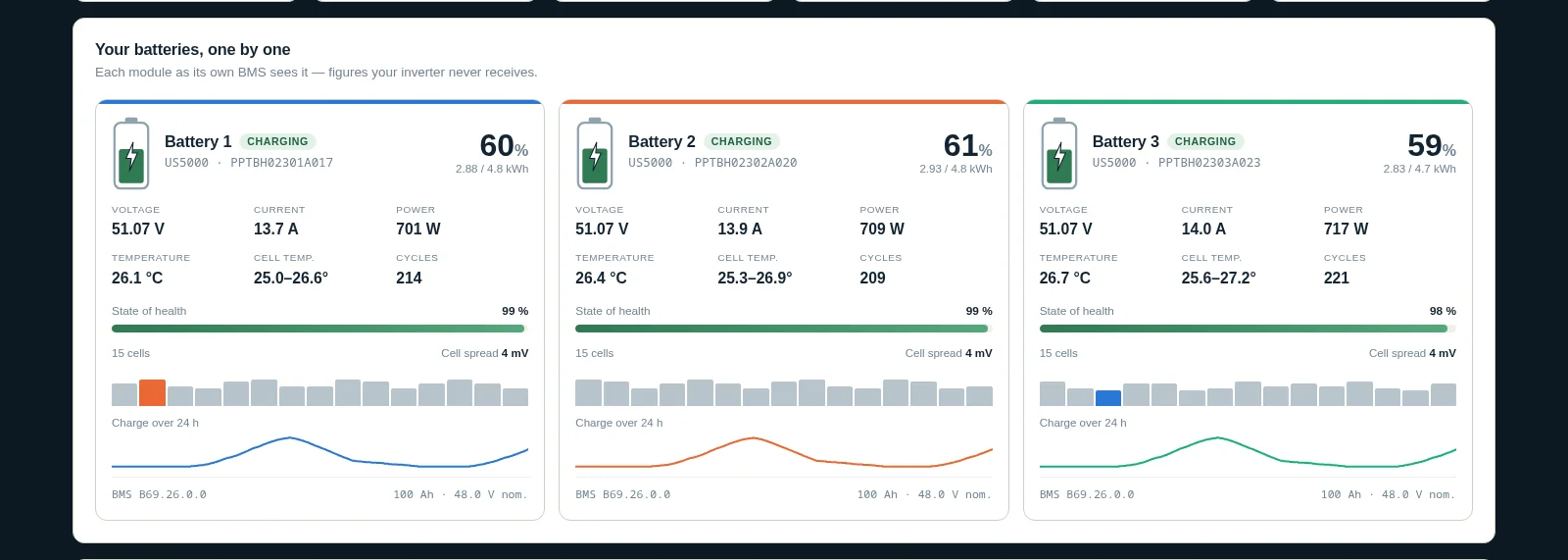
Without it, you need a laptop, a Console cable and Pylontech's BatteryView or a terminal program: connect to the master's Console port, ask each address for its information and note the Main Soft version line, battery by battery. Our BatteryView guide explains the connection. It works, but once, on the day you do it.
How the firmware is aligned
Updating a Pylontech BMS is an installer's job, and Pylontech's own procedure says why. It is done with BatteryView on a Windows laptop, through the battery's Console port with an RS232-to-USB cable at 115200 baud, using the firmware files supplied by Pylontech or your distributor, never a file from a forum. The points that matter:
- Save the battery's data first. Pylontech asks for a screenshot of the battery's information before any maintenance, and for its cycle and event history to be saved: it is the record a warranty claim relies on.
- Pick the file for the board, not just the model. For US2000C, US3000C and UP5000 whose serial number has
E2orC3as its 8th and 9th characters, Pylontech requires the .zip package and BatteryView 3.0.28 or later, and recommends that combination for every US2000C/US3000C upgrade to avoid a wrong file damaging the board. - One battery at a time, and never interrupt it. The update ends when BatteryView shows the serial number again; a progress bar that stalls may need the Program button pressed once more.
- Check the result on every battery afterwards: the version, the alarms, the state of charge of each module.
Pylontech's maintenance procedure is written for authorised engineers and warns that commands outside it take the product out of warranty. That is the honest reason we never suggest doing it yourself, and why Pylon-Monitor does not update the BMS: it tells you what each battery runs and lets the right person decide.
Before you add a battery to an existing stack
- Note the firmware of the batteries you already have — your Pylon-Monitor dashboard has it, battery by battery.
- Ask your seller which version the new battery ships with, and whether your installer will align the stack when fitting it.
- Put a C-series battery at the head of the stack when older US2000B or US3000A modules share the system: Pylontech's documentation makes the C-series battery the master in mixed setups. With several groups, see our LV-HUB guide.
- Mixing models? Pylontech's warranty excludes damage caused by connecting "different type battery modules". If you combine, say, US3000C and US5000, keep your installer's or distributor's written confirmation that the combination is approved. More in our warranty guide.
- After the first full charge, check that the new battery's cells line up with the others. The Force Balance session does exactly that on demand.
For the wiring and addressing side of a multi-battery stack, see our parallel batteries guide; for the alarms themselves, the error codes guide.
Frequently asked questions
- Is it a problem if my Pylontech batteries run different firmware?
- Usually not. About half of the multi-battery stacks we monitor mix versions and most work perfectly. It is worth aligning them when the stack shows communication alarms, a jumping state of charge, a module not recognised, or one battery that never catches up during balancing.
- How do I find the firmware version of each Pylontech battery?
- Each battery reports it on the Console port as "Main Soft version", for example B69.26.0.0. Pylon-Monitor reads it automatically for every battery and shows it on the online dashboard; without it you need a laptop, a Console cable and BatteryView, battery by battery.
- What does B68 or B69 at the start of the version mean?
- It is the BMS platform, the generation of board inside the battery. B68 and B69 boards have separate firmware lines: a B68 battery cannot run B69 firmware, so a stack that mixes them will never show identical versions, and that is normal.
- Can I update the Pylontech BMS firmware myself?
- Pylontech's procedure is written for authorised engineers: BatteryView on Windows, an RS232 cable on the Console port, the right file for the board (the wrong one can damage it) and commands outside the procedure void the warranty. Ask your installer or distributor.
- Which battery should be the master when I add a new one?
- The master is the battery at the head of the chain, whose Link port 0 is empty. When older US2000B or US3000A modules share a system with C-series batteries, Pylontech's documentation makes the C-series battery the master.
- Does Pylon-Monitor warn me about a firmware mismatch?
- Yes, on the dashboard: a notice appears above the battery identification table when batteries of the same model differ, saying whether it is a platform, release or patch difference, and each battery shows the newest version seen on the same platform. It never sends an e-mail about it.
Pylon-Monitor reads the BMS firmware of every battery in your stack and tells you when they differ, on the free online dashboard, with every cell of every battery.
Order now — €64 One-off purchase, €64 all in. No VAT, no subscription.