What the LV-HUB does — and when you need one
A single Pylontech stack — a "group" or "pile" in Pylontech's manuals — has one master battery that speaks for every battery behind it, up to 16 of them. Above that, or when the batteries are split into several stacks, each group has its own master, and an inverter can only listen to one battery voice on its CAN port. The LV-HUB solves that: it collects the CAN data of every group and hands the inverter a single, combined stream.
| Point | What Pylontech's manual says |
|---|---|
| Groups per hub | Up to 6 battery groups |
| Batteries per group | Up to 16 US2000C, US3000C, US5000 or UP5000 |
| Link to the inverter | CAN, from the hub's CAN OUT port |
| Firmware updates | Through the hub's RS232 port, marked "Debug" |
| RS485 instead of CAN | With C-series and US5000 batteries, several groups on RS485 do not need an LV-HUB — the battery manual describes that wiring |
| Old and new batteries | When older US2000 modules share a system with US2000C, the manual uses an LV-HUB with each US2000C as the master of its own group |
What the hub does not do: charge or balance anything. Every battery's BMS still protects and balances its own fifteen cells. The hub only carries information — which is exactly why its firmware matters: if it carries it badly, the inverter makes decisions on the wrong numbers.
How a system with an LV-HUB is wired
- Inside each group, the batteries are chained as usual: Link port 1 of one battery to Link port 0 of the next.
- The masters of the groups are chained to each other: the B/RS485 port of one master to the A/CAN port of the next group's master; the last master's B/RS485 stays empty.
- The A/CAN port of the first group's master goes to one of the hub's numbered ports, with the special cable from Pylontech's kit — a standard network cable does not work there.
- On the hub, CAN IN is linked to port 0, and CAN OUT goes to the inverter's CAN port.
The start-up order matters too. The hub's own address switches must read 000001, every battery's address switches stay at their default, and each group master is switched on in turn. When the first group's master has beeped three times — every group online — only that master's address switch is changed to 0100, the hub cable is connected, and the hub is switched on: it beeps, and its four green LEDs show the number of groups it sees, in binary. Many "my hub doesn't see everything" cases are this sequence done in the wrong order — worth redoing before suspecting the firmware.
Why the hub firmware matters
The hub's firmware decides how the groups are counted and addressed, how their values are combined, and how much detail is passed on to the inverter. Installers on Victron's community forum have documented the differences between versions well:
- Older versions (1.5 is often mentioned) could show capacity or display problems.
- Up to 1.7, a Victron GX did not get the per-module detail; 1.8, which Victron's own compatibility table lists for LV-HUB systems, added it.
- Large systems — more than 32 modules — needed an up-to-date hub to show every battery, not only the first 16.
- More recent releases exist; your distributor or Pylontech has the current file.
Pylontech's manual names the symptom that matters most: when the number of address assignments does not match the actual number of racks, its fix is to check the cabling, restart the whole system — and upgrade the LV-HUB.
Symptoms of an LV-HUB problem, and what to check first
| What you see | Check first | Then |
|---|---|---|
| The hub's status LED flashes red, or it shows fewer groups than you have | The start-up sequence, the hub address (000001), the first master's switch (0100), the special cable | Hub firmware |
| The inverter shows fewer batteries than installed | Group cabling between masters (B/RS485 to A/CAN, last one empty) | Hub firmware, then each battery's firmware |
| Address allocation error | Cables in the right ports — Link ports inside a group, RS485/CAN between masters | Hub firmware |
| No communication with the inverter at all | The inverter cable (CAN OUT, correct pinout on the inverter side), the hub's power | Your inverter's battery settings |
| One group consistently takes less current or ends at a different charge | DC cabling and fuses of that group | The battery firmware of that group — see our firmware mismatch guide |
The last line is the one nobody sees from the inverter, because the hub hands over a single combined state of charge. It is also the one that tells you the most about the long-term health of a large system.
How the LV-HUB firmware is updated
Like the batteries, the hub is updated with Pylontech's BatteryView on a Windows laptop, through the hub's RS232 "Debug" port, using the file supplied by Pylontech or your distributor.
- Use a proper USB-to-RS232 cable. Installers report that home-made cables which work on a battery's Console port can fail on the hub.
- Note the version before and after, and the number of groups the hub shows.
- Do not cut the power during the update. If it stalls, contact the distributor before switching anything off — updates stopping part-way are a known source of support threads.
- Check the batteries' own firmware at the same visit. An up-to-date hub in front of batteries on very different releases only moves the problem.
Monitoring a multi-group system with Pylon-Monitor
Pylon-Monitor reads a group through its master's Console port — every battery of that group, every cell, up to 16 batteries. In a system with several groups, each group has its own master and its own Console port, so one Pylon-Monitor per group gives you every battery of the whole system. All of them can be linked to the same free account, each with its own name ("Group 1", "Garage rack"…), and you switch from one to the other on the online dashboard.
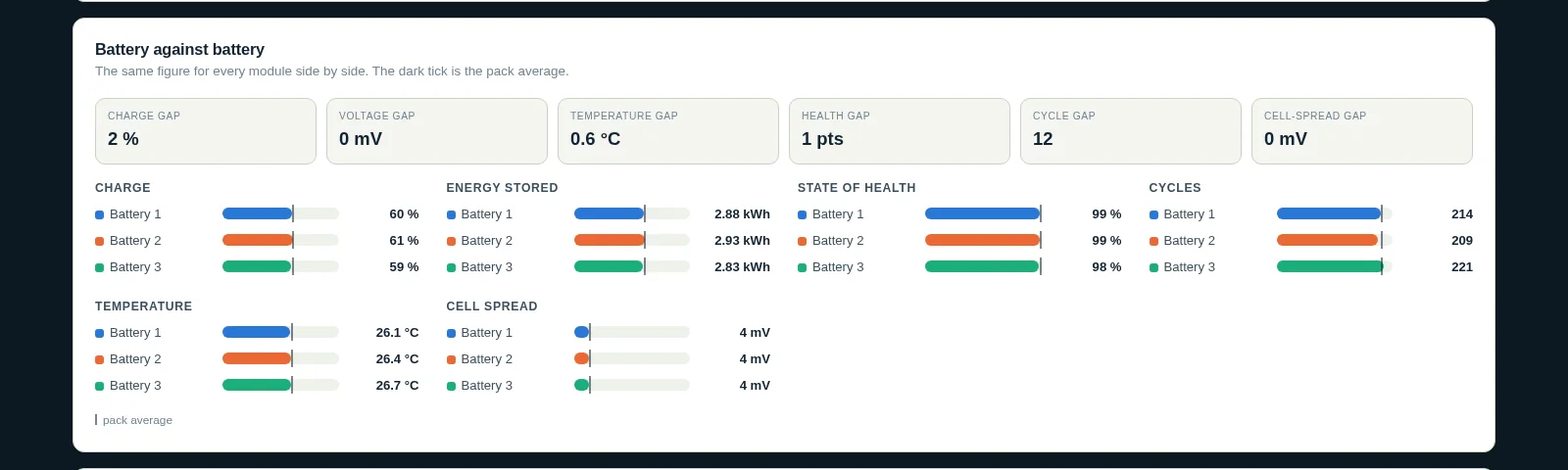
That is precisely the view the LV-HUB takes away from the inverter: each group's own charge, current, temperatures and cells, and each battery's BMS firmware — so a group that lags behind, or a battery on an odd release, stands out. To be clear about the limits: Pylon-Monitor reads the batteries, not the hub, so it does not show the LV-HUB's own firmware version; that one is read with BatteryView on the hub's debug port.
For the wiring of a single stack, see our parallel batteries guide; for the inverter link itself, the CAN, RS485 and Console guide; and for the alarm codes, the error codes guide.
Frequently asked questions
- What is the Pylontech LV-HUB?
- A CAN communication hub that joins up to 6 groups of Pylontech low-voltage batteries — up to 16 US2000C, US3000C, US5000 or UP5000 per group — into one data stream for the inverter. It does not charge or balance anything: each battery's BMS still does that.
- Do I need an LV-HUB for two stacks of Pylontech batteries?
- Not always. Pylontech's manual states that with C-series and US5000 batteries, several groups on RS485 do not need an LV-HUB. It is used for multi-group systems on CAN, and when older US2000 modules share a system with US2000C.
- How do I know which LV-HUB firmware I have?
- Connect a laptop with BatteryView to the hub's RS232 port marked "Debug". The version is not passed on through the batteries, so a battery monitor — Pylon-Monitor included — cannot show it.
- What are the symptoms of outdated LV-HUB firmware?
- Groups or modules missing on the inverter, an address count that does not match the number of racks, a Victron GX without per-module detail, or only 16 batteries shown in a larger system. Check the start-up sequence and cabling first, then update the hub.
- How is the LV-HUB firmware updated?
- With Pylontech's BatteryView on a Windows laptop, through the hub's Debug port, with a proper USB-to-RS232 cable and the file from Pylontech or your distributor. Do not cut the power during the update; if it stalls, contact the distributor.
- Can Pylon-Monitor monitor a system with an LV-HUB?
- Yes, one Pylon-Monitor per group, each on its group master's Console port, all linked to the same free account. You see every battery and cell of every group — the detail the hub does not pass on to the inverter.
One Pylon-Monitor per group, one free account: every battery and every cell of a multi-group Pylontech system, on the online dashboard.
Order now — €59 One-off purchase, €59 all in — no VAT, no subscription.