What the Pylontech warranty actually says
The terms below come from Pylontech's consumer warranty for the US series sold in the European Union and the United Kingdom (document EU20WS7055) — covering US2000, US3000, US2000C, US3000C, US5000 and US5000-B. Warranty documents differ by region and by date, so check the one supplied with your battery; the structure is the same everywhere.
| Point | What the warranty says |
|---|---|
| Duration | 7 years, starting from the installation date, or six months after manufacture if that comes first |
| Extension | 10 years, free, if you register the battery on Pylontech's website |
| Capacity | At least 70 % of the rated energy during the warranty; with the 10-year extension, not less than 60 % at the end of it |
| Use | Bought from an authorised reseller, installed indoors, installed and maintained according to the manual, used for energy storage on a daily cycle |
| Deadline | Report a defect within 48 hours of discovering it — online claim form if registered, otherwise the warranty card to the reseller or to Pylontech |
| What to provide | The warranty certificate, the purchase invoice showing the delivery date, and the system log data recorded by the battery |
| Remedy | Repair or replacement; a repaired or replaced battery continues the original warranty, it does not restart it |
Two more things to know. Pylontech's warranty comes in addition to your rights under consumer law — in the EU, the seller's legal guarantee of conformity of at least two years still applies. And Pylontech makes the final decision; it may ask for a root-cause analysis, and if you dispute its verdict the battery goes to a certified laboratory, at your cost unless your claim turns out to be valid.
How capacity is judged — and why the SOH on screen is not the verdict
The SOH a Pylontech battery reports is its BMS's own estimate. It is a very good indicator, and it is what you should watch — but it is not the measurement Pylontech uses to decide. When capacity is disputed, the warranty specifies a test on a single module: at 25 °C, charged at constant current (0.2C) up to 54 V until every cell is above 3.50 V or the current falls below 1 A, then discharged at 0.2C down to the low-voltage cut-off. What comes out of that discharge, against the rated energy on the label, is the capacity that counts.
In practice: an SOH of 85 % after six years is ageing, not a defect. An SOH heading towards 70 % well inside the warranty — or one module falling much faster than its neighbours bought at the same time — is a case worth preparing. The trend matters more than any single reading: the BMS updates its estimate in steps, and one odd value proves nothing on its own.
Defect or normal ageing? Reading the signs
| What you see | Most likely | What to do |
|---|---|---|
| SOH slowly decreasing, at the same pace on every module | Normal ageing | Nothing — keep the history |
| One module's SOH falling much faster than identical modules bought together | Possible defect | Document it over a few months, then talk to your installer |
| SOH approaching 70 % inside the warranty (60 % near the end of an extended one) | Possible warranty case | Prepare the file below |
| Cell spread at full charge above about 100 mV that stays there after a long full charge | A weak cell rather than a balancing problem | Run a Force Balance; if one cell still stays behind, keep the report |
| One cell clearly lower than the others at rest, and always the first to sink at the end of discharge | Possible defective cell | Document it and contact your installer |
| A module that refuses to charge or discharge, or keeps going into protection at normal temperatures while the others are fine | Possible BMS or cell fault | Note the alarm and the time, contact your installer within 48 hours |
| Less usable capacity in winter, slower charging in the cold | Physics — cold LFP accepts less current | Nothing |
| Over-voltage alarms when the inverter pushes a high charge voltage | Installation setting | Check the inverter's battery settings — see our charge voltage guide |
| Communication alarms after adding a battery | Cabling, addressing or firmware | See our BMS firmware guide and error codes guide |
What the warranty does not cover
Pylontech's list of exclusions is long; these are the items that catch real owners:
- Inverter or charger failure, and installation with an inverter or charger not certified by Pylontech.
- Use outside the recommended ambient temperature, or otherwise not according to the manual.
- Installation, modification or repair by anyone other than Pylontech or a certified installer.
- "Any attempt to extend or reduce the life of the product without written confirmation from Pylontech, whether by physical means, programming or others" — which is why we never recommend changing BMS parameters yourself.
- Moving the battery to another place without Pylontech's written confirmation.
- Connecting different types of battery modules, or batteries not made by Pylontech.
- Normal wear and tear.
Building a claim file that gets taken seriously
Distributors and Pylontech handle many vague complaints. A claim with dates, serial numbers and curves stands out. Prepare this:
- Identity of the battery. Model and serial number of the module concerned (and of the others in the stack), the warranty certificate, the purchase invoice with the delivery date, and your registration confirmation if you extended to 10 years.
- The battery's own log. This is the "system log data" the warranty asks for. Your installer reads it with Pylontech's BatteryView: Pylontech's procedure saves the cycle data and, above all, the event data, plus a screenshot of the battery's information before any intervention. Ask for those files to be kept.
- The history. When did the problem start, how did it develop? SOH over the months, cycle count, temperatures, the voltage of every cell at full charge and at the end of discharge, the alarms you saw and when.
- What has been tried. A full charge with a long hold, a firmware check, the inverter settings — with the result.
- A short description: the module, the symptom, since when, how often, in two or three sentences.
Where Pylon-Monitor helps
The hardest part of that file is the history: nobody connects a laptop to their battery every week for three years. Pylon-Monitor does it for you, from the day it is plugged in. The online dashboard keeps up to three years of history for every battery — state of charge, SOH, cycles, temperatures and cell spread — and shows each module's model, serial number and BMS firmware.
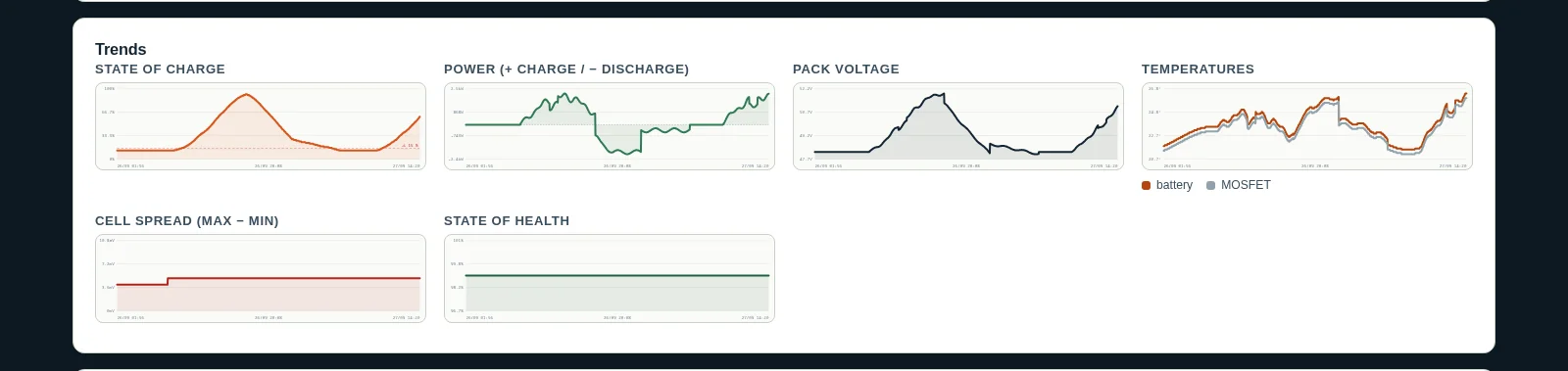
- Per-battery CSV export: one row per battery per reading, with SOH, voltage, current, temperature, cycles and every cell voltage — a file your installer or the distributor can open in any spreadsheet.
- Smart Balance and Force Balance: a dated report of the spread at full charge, battery by battery and cell by cell — and, when one cell stays behind, its battery, its number and the serial number to quote.
- Every module compared with the others, so a battery ageing faster than its twins stands out months before it becomes a problem.
To be clear: this history complements Pylontech's own log, it does not replace it, and no data guarantees the outcome of a claim — Pylontech decides. But a claim that says "module 3, serial number …, SOH from 96 % to 74 % in 18 months while its two twins lost 4 points, cell 11 always 120 mV behind at full charge, curves attached" is a very different conversation from "my battery doesn't last as long as before".
Step by step when you suspect a defect
- Note the date and time you noticed the problem: the 48-hour reporting window starts there.
- Leave the battery in its normal setup: do not open it, move it or change its BMS settings.
- Report it: online claim form if the battery is registered, otherwise the warranty card to your reseller or to Pylontech. In practice, start with the installer or reseller you bought from.
- Gather the file above — export the Pylon-Monitor history, ask your installer for the BatteryView logs.
- Answer Pylontech's questions, and keep copies of everything you send.
For the readings themselves, our SOC and SOH diagnostics guide explains what each value means and how far it can be trusted.
Frequently asked questions
- How long is the Pylontech battery warranty?
- For US-series batteries sold in the EU and the UK, 7 years from installation (or from six months after manufacture if that comes first), extended to 10 years for free if you register the battery on Pylontech's website. Check the warranty document supplied with your battery, as terms differ by region and date.
- What SOH is covered by the Pylontech warranty?
- The warranty guarantees at least 70 % of the rated energy during the warranty period, and with the 10-year extension not less than 60 % at its end. The SOH shown by the BMS is an estimate; in a dispute Pylontech measures capacity with a defined test on the single module.
- How quickly must I report a Pylontech battery defect?
- Within 48 hours of discovering it, according to Pylontech's EU warranty: through the online claim form if the battery is registered, otherwise with the warranty card to your reseller or to Pylontech. In practice, start with your installer or reseller.
- What do I need for a Pylontech warranty claim?
- The warranty certificate, the purchase invoice with the delivery date and the battery's own system log data, which an installer reads with BatteryView. A history of SOH, cycles, temperatures and cell voltages, such as the one Pylon-Monitor keeps, makes the case much clearer.
- Does changing BMS settings void the Pylontech warranty?
- Pylontech's warranty excludes "any attempt to extend or reduce the life of the product without written confirmation from Pylontech, whether by physical means, programming or others". Reprogramming BMS parameters without that confirmation puts the warranty at risk.
- Is a cell imbalance a warranty defect?
- Not by itself: cells drift and the BMS rebalances them at full charge. A spread at full charge that stays above about 100 mV even after a long full charge points to a weak cell — document it with a Force Balance report and talk to your installer.
Pylon-Monitor records the history a warranty claim needs — SOH, cycles, temperatures and every cell of every battery — for up to three years, on the free online dashboard.
Order now — €59 One-off purchase, €59 all in — no VAT, no subscription.