The question isn't "which is better". It's "which one fits how you live with a battery"
PylonCheck and Pylon-Monitor do the same headline job: they let you see a Pylontech battery from your phone instead of crouching next to it with a laptop and a console cable. If you only read the front page of either site, they look interchangeable. They are not, and the difference is not a feature checkbox. It is a fork in the road that decides what you own, what you depend on, and what happens the day something goes wrong.
PylonCheck is a cloud service with a box attached. The box is a small single-board micro-PC that reads the battery over its Console (RS-232) port and reaches the network through a cable to your router, then connects to PylonCheck's servers on its own. Everything you see, you see through their cloud — their own page says the local dashboard is Planned and that “customers today use the cloud view”.
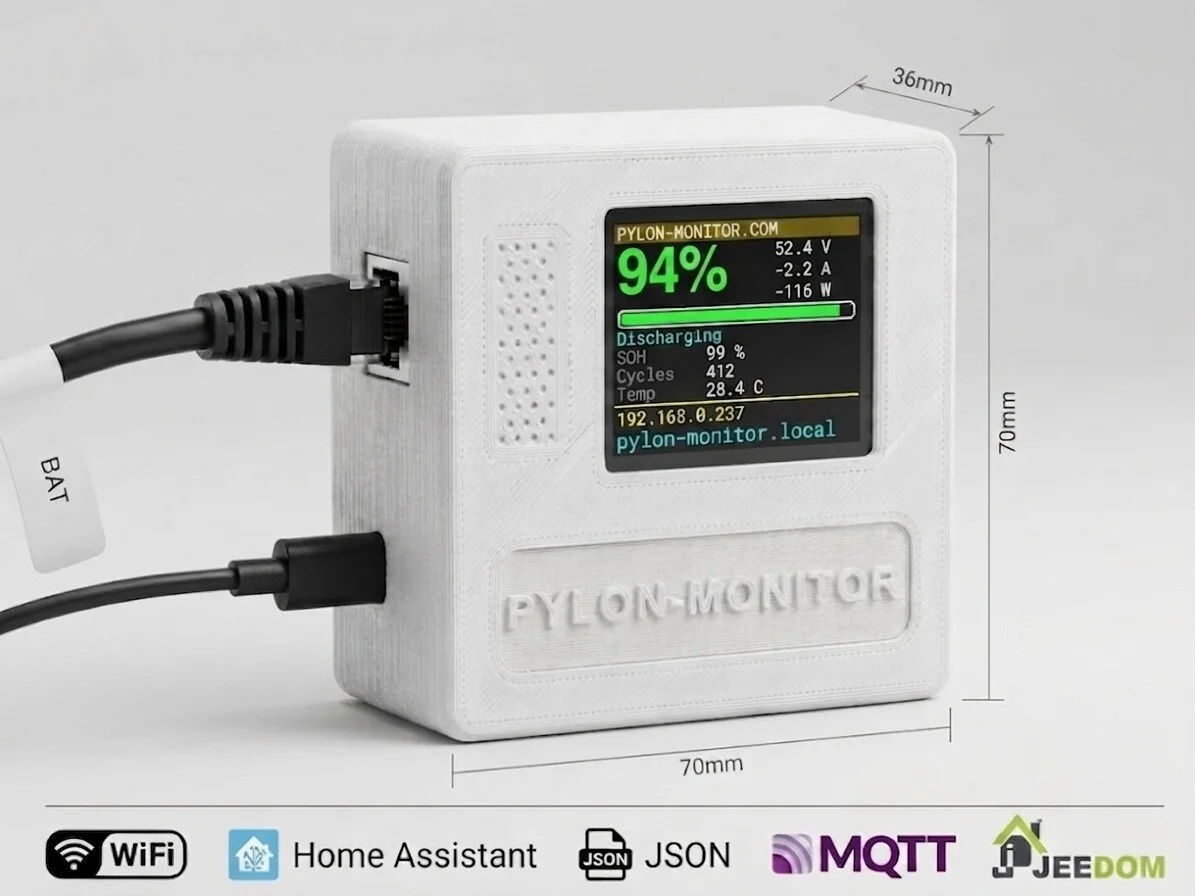
Pylon-Monitor is a device that works on its own, with the cloud as an option you switch on. It reads the battery's Console port, shows the numbers on its own screen and on a dashboard served from the device itself on your home network, and, if you want, mirrors that to a page you can open from anywhere. Turn the internet off and everything except the "from anywhere" part keeps working.
This guide walks through every difference that actually changes the decision, in plain language, including the two where PylonCheck comes out ahead. If you want the dense point-by-point version, the full Pylon-Monitor vs PylonCheck comparison table has all 70 rows.
The short answer
For the overwhelming majority of home installs (a low-voltage Pylontech US-series stack, an inverter already using the battery's CAN or RS485 port, someone who wants to glance at the battery without logging into anything), Pylon-Monitor is the better buy, at about a third of the price. Choose PylonCheck only if you specifically need one of two things:
- you want to change BMS settings or update the battery's firmware remotely;
- you run a high-voltage Pylontech pack (Force H2, H48050) and you would rather have a track record than a first: Pylon-Monitor reads those since firmware 2.8, on units ordered from 5 September 2026, but no real high-voltage pack has been connected to one yet.
Everything below is why the first sentence holds for everyone else.
Difference 1: who controls access to your own data
This is first because it is the one choice you cannot walk back later. A box that turns out to be too expensive can be replaced next year. A monitoring product whose vendor is the only route to your own battery data is a bet that the vendor still exists, still runs the servers, and still lets you in, in five years or in ten.
PylonCheck routes everything through its cloud. If their service has an outage, your view is down. If the company winds down or is sold, your view goes with it. Your battery data lives on their infrastructure by default.
Pylon-Monitor's dashboard is served by the device, on your LAN. Your router can be down, your ISP can be out, our company can vanish overnight and you still open a browser on your home network and see your battery, live, with history. The optional cloud mirror is exactly that: optional, and additive. Nothing about the core product depends on us staying in business. For a piece of equipment meant to sit on a wall for a decade, that is not a small thing.
Difference 2: does it actually plug in at your house?
This one settles some purchases before price is even discussed.
Correction, 7 September 2026: this guide used to say PylonCheck required an active Ethernet port on the battery. Their comparison page states otherwise — their box reads Console / RS-232, as ours does, and “the battery does not need active Ethernet”. We were wrong and we have removed the claim here and from the comparison table.
What does still differ is the run to your network. The standard PylonCheck Box uses wired Ethernet — a deliberate choice on their part, and a cable you have to pull to wherever the battery lives: a garage, a cellar, a technical room. Their WiFi is “optional” and by prior arrangement.
Pylon-Monitor uses the Console (RS-232) port, which every US-series low-voltage unit has and which your inverter never touches: the inverter talks to the battery over CAN or RS485, leaving Console free. (If you're unsure which port does what, the guide to Pylontech's CAN, RS485 and Console ports lays it out.)
Then there's the run to your network. PylonCheck wants a network cable to the router; WiFi is "by prior arrangement" only. Pylon-Monitor has WiFi built in with a captive portal: connect your phone to the box, pick your network, done in under two minutes, no cable across the garage. Power is the same story: PylonCheck ships a 230 V mains adapter; Pylon-Monitor runs on any 5 V USB source (a phone charger, a spare USB port on the inverter, a power bank), drawing under half a watt.
Difference 3: price
Pylon-Monitor is €59. PylonCheck is roughly 180 € (4 400 CZK). Neither has a subscription, and both include cloud history. For the same job on a low-voltage Pylontech stack, that is about a three-to-one difference with nothing traded away on the cheaper side, as the rest of this guide should make clear, the shorter column in every table below is PylonCheck's, not ours.
Difference 4: the screen, the local API and smart-home integration
Pylon-Monitor has a 1.8" colour screen on the device. Walk past it, read state of charge, voltage, health and cycle count. No phone, no login, no network. PylonCheck has no display at all; every reading requires a connected device and their cloud.
Pylon-Monitor exposes a real local API. One HTTP call returns the whole battery state as JSON. MQTT auto-discovery drops ten sensors straight into Home Assistant with no YAML. Jeedom, Node-RED, Domoticz, openHAB and a two-line shell script all read the same endpoint on your LAN. On PylonCheck's side both are marked Planned on their own comparison page, which adds that “a public, supported local PylonCheck interface has not been released yet”; their Home Assistant integration is in canary, with production tokens “not active yet”.
Difference 5: history, and energy in kWh
Both keep cloud history. Pylon-Monitor adds the number a single instantaneous reading can never give you: energy in kWh, charged and discharged, per day — today, and every day for the last fortnight, plus CSV export of the lot. That figure only exists because something has been keeping continuous history and doing the maths. And because the dashboard is local, you can pull that history up with the internet completely down.
If you want to understand which of these logged numbers actually matter for battery health, the Pylontech diagnostics guide covers SOC, SOH and cell balance in plain terms.
Difference 6: it tells you when it goes quiet
A box that has lost power cannot send an alert to say so. Pylon-Monitor is watched from our side: six hours of silence and you get an email, in your language, listing what to check first. PylonCheck does not advertise an equivalent. Push alerts to your phone for BMS alarms and threshold crossings are built in on the Pylon-Monitor side as well.
For installers: the fleet view
If you maintain more than one system, Pylon-Monitor gives you every site on one screen, worst first, with each alarm judged against that pack's own configured thresholds and its own 30-day normal. A 30 mV cell spread is noise on one pack and an early warning on another. PylonCheck does not advertise a multi-site installer view.
The hardware itself
Pylon-Monitor is our own board and our own firmware, assembled and tested in France, on firmware v3.4.3 that is sold and installed today. Updates are HMAC-signed (the device refuses anything altered), arrive through a web page in under a minute with settings preserved, and are free for life.
PylonCheck's hardware is, in their own words, a "NanoPi, Raspberry Pi or equivalent, depending on component availability", and their own site describes the product as a functional beta and apologises in advance for rough edges. That is a fair thing for a small vendor to do; it is also a fair thing for a buyer to weigh.
Where PylonCheck is ahead, and we'll say so plainly
Two things, no spin:
- Time in the field on high-voltage packs. This one used to read “Force H2 and H48050 work with their box and not with ours”. Since firmware 2.8 that is no longer true: the new generation of Pylon-Monitor reads a Force H2 tower through its management unit, and the comparison row is now a tie. What we cannot claim is experience. That support was written from real console readings of two different management-unit firmwares, but no high-voltage pack has yet been plugged into a Pylon-Monitor, while theirs has been doing it in production. If you run HV, that is a fair reason to prefer them.
- Remote BMS settings and battery firmware. PylonCheck lets you change BMS settings and push battery-firmware updates remotely. For what most people actually want from that, which is cells brought back in line, Pylon-Monitor has Smart Balance, described just below.
If you need either of those, buy PylonCheck. We would rather tell you than sell you the wrong box.
One caveat on that second point, because balancing is what most people are actually shopping for. PylonCheck's answer is a two-hour Force Balance, which they describe as acting “on the whole stack, not an individual slot”, without claiming it works on every model. Pylon-Monitor's answer is Smart Balance, on the free online dashboard: every full-charge window is measured automatically, your pack gets a balance score and a clear verdict, and a cell that stays behind is named with its battery and serial number. When a balance is due, one click starts a guided session — the exact setting for your inverter, a two-hour hold at full charge that starts by itself, every cell followed live and a before/after report by e-mail. And if the spread stays wide after a full session, you learn what a balance alone would have hidden: one cell or one module is genuinely weaker. All the details are in our Force Balance & Smart Balance guide.
The decisive rows, side by side
Compared on September 7, 2026 from information published on pyloncheck.com, including their own comparison page. A competitor's product changes; if anything below is out of date, tell us and we will correct it — as we did with two rows on 7 September.
| Criterion | Pylon-Monitor | PylonCheck |
|---|---|---|
| Independence — what you actually own | ||
| Keeps working if the vendor disappears | Yes — it never needed us | No — the box is a client of their cloud |
| Where your battery data lives | On your device. Cloud is opt-in, off by default | "Customers today use the cloud view" |
| Cell balancing | Smart Balance — a guided balancing session from the dashboard, with any inverter, every cell followed live | "Force Balance" — a two-hour session |
| Can a third party act on your battery remotely? | No — impossible by design | Yes — "after approval" |
| Effect on your Pylontech warranty | None — balancing is done by your battery's own BMS, as Pylontech designed it | Their own feature writes to the BMS |
| Usable with no account and no sign-up | Yes | No |
| Runs entirely on your own network | Yes | Planned — their own status |
| Price and commitment | ||
| Device price | 59 € | ≈ €180 (4 400 CZK incl. VAT; 3 400 CZK launch offer on their first 5 units) |
| What the same LV monitoring costs you | 1× | ≈ 3× more |
| Subscription | None | None |
| Cloud history | Included, free | Included, free |
| How far back the history goes | 3 years (7 d raw, 90 d 5-min, 3 y hourly) | Not specified |
| The price you actually pay | 59 € all-in — no VAT to add | 4 400 CZK, 21% Czech VAT included |
| Warranty on the device | 2 years | 2 years |
| 14-day right of withdrawal (EU) | Yes — written into the terms | Not advertised |
| Delivery and what is in the box | Shipped from Europe, tracked, RJ45 + USB cables included | Not advertised |
| Software-only license for your own hardware (BYOH) | Not offered — hardware and firmware are one product, nothing extra to buy or configure | 500 CZK, one-time — runs on your own Raspberry Pi, notebook or Linux PC |
| Short-term rental | Not offered — one flat price, the device is yours to keep | 7 days, 990 CZK incl. VAT, plus a 4,000 CZK refundable deposit — Czech Republic and Slovakia only, 2 units available |
| Hooking it up | ||
| Battery port used | CONSOLE (RS-232) | CONSOLE (RS-232) |
| Link to your network | WiFi — no cable to run | Wired Ethernet on the standard box |
| WiFi | Built in, captive portal | "Optional WiFi", by arrangement |
| Power | Any 5 V USB source | 230 V mains adapter |
| Setup time | Under 2 minutes | Not advertised |
| What you need to install | Nothing — a browser | Not advertised |
| Who installs it | You do. Plug and play | "A controlled installation" — their words |
| Batteries supported | ||
| Low-voltage models supported | US5000 / US5000C / US5000-1C, US3000C, US3000, US2000C, US2000B+, UP2500, Force-L1 | 3 verified: US2000C, US3000C, US5000 |
| Batteries in one stack | Up to 16, mixed models allowed | Not specified |
| Compatibility claim | Any LV Pylontech with a Console port at 115200 baud | "We do not claim universal compatibility with every revision" |
| High-voltage packs (Force H2, H48050) | Yes — generation 2, firmware 2.8 (beta) | Yes |
| What you see | ||
| Screen on the device | 1.8" colour IPS TFT | None — "the standard Box has no TFT" |
| Choose what the screen shows | Yes, with a live preview | No screen to configure |
| Dashboard without internet | Yes — it lives on the device | Planned — their own status |
| Dashboard from anywhere | Yes, optional | Yes |
| Charge, voltage, current, power, temperature | Yes | Yes |
| Per-cell voltages | Yes | Yes |
| BMS alarms | Yes | Yes |
| Per-battery detail | Yes, all 16 batteries | Yes, in supported installations |
| SOH, cycles, imbalance | Yes | Yes |
| Energy in kWh, charged and discharged per day | Yes — every day, 14 days back | Not advertised |
| Cell imbalance judged against that pack's own normal | Yes — against its own recent normal | Not advertised |
| CSV export | Yes — locally and in the cloud | Yes |
| Raw console replies, for diagnosis | Yes | Not advertised |
| Event log and boot history that survive a crash | Yes | Not advertised |
| WiFi signal history and gateway test | Yes | Not advertised |
| Live refresh rate | Every ~4 seconds | Not specified |
| Alerts | ||
| Email alert when the device goes silent | Yes — email after 6 h of silence, in your language | Not advertised |
| Push alerts to your phone | Yes — Pushover, with a test button | Not advertised |
| Your own SOC and temperature thresholds | Yes, with hysteresis | Not advertised |
| What the alerts cost | Included, free | Not advertised |
| What happens when the cells drift apart | Smart Balance: every full charge measured automatically, a balance score, the weak cell named with its serial number — and a guided 2-hour session with your inverter, followed live, with a before/after report cell by cell. | "Force Balance" — a two-hour session on the stack. "On LV it acts on the whole stack, not an individual slot; we do not claim universal support for every model." |
| Integration | ||
| Local JSON API | Yes — GET /api.json, one call, everything | Planned — their own status |
| MQTT auto-discovery | Yes — 10 sensors, zero YAML | Planned — their own status |
| Home Assistant | Working today — MQTT auto-discovery or REST | Canary — "not active yet" |
| Jeedom, Node-RED, Domoticz, openHAB | Yes — all four read the same endpoint | Not advertised |
| Your own scripts | Yes | Not advertised |
| Works with no internet at all | Yes | Planned — their own status |
| Integration documentation | Published on the site | Not advertised |
| The device itself | ||
| Hardware | Own board and firmware, assembled and tested in France | Off-the-shelf micro PC, "model varies with stock" |
| Firmware updates | Signed OTA, one click, free for life | Planned — their own status |
| Maturity of what ships today | v3.4.3, in production | "A working beta" — their words |
| Public changelog | Published on the site | Not advertised |
| Power draw | Under 0.5 W | Not advertised |
| Moving parts | None — no fan, no SD card | Not advertised |
| Locked out or moved house | 3 taps on the button — no support ticket | Not advertised |
| How hard the console port is polled | One command every 10 s, deliberately paced | Not specified |
| Service and reach | ||
| Support | 7 days a week, answered within 24 h | "Almost 24/7" — their words |
| Who answers you | The person who wrote the firmware | "A real person with hands-on experience" |
| Installer fleet view | Yes — live today | "Installer roles are not finished yet" |
| Install guide after delivery | Yes — sent automatically, in your country's language | Not advertised |
| Languages | 6 | 2 |
Source for the PylonCheck column: pyloncheck.com, consulted September 7, 2026. Quoted phrases are theirs.
Choosing in one minute
Choose PylonCheck if: you specifically want to change BMS settings and update battery firmware from a distance, or you run a high-voltage pack and want a vendor with time in the field on it rather than support written from published readings, and you are comfortable with a cloud-only service and a self-described beta at around 180 €.
Choose Pylon-Monitor if: you have a low-voltage US-series stack, you want a screen and a dashboard that keep working with the internet down, you value a local API and Home Assistant integration, you would rather not run a cable or depend on a vendor's servers, and you would rather pay €59 once.
Frequently asked questions
- Is Pylon-Monitor or PylonCheck cheaper?
- Pylon-Monitor is €59; PylonCheck is roughly 180 € (4 400 CZK). Neither charges a subscription and both include cloud history, so for a low-voltage Pylontech stack it is about a three-to-one price difference for the same job.
- What is the main difference between Pylon-Monitor and PylonCheck?
- PylonCheck is cloud-first: their own comparison page marks the local dashboard as Planned and says customers today use the cloud view, so if their service is down or gone so is your view. Their standard box also needs a network cable to your router. Pylon-Monitor works fully on your own network: a screen on the device, a local dashboard, a JSON API and Home Assistant, with worldwide access as an option you switch on.
- When is PylonCheck the better choice?
- Mainly one case: if you need to change BMS settings or update the battery firmware remotely, PylonCheck can do that. For balancing the cells, Pylon-Monitor has Smart Balance. High-voltage packs (Force H2, H48050) are no longer a reason on their own: Pylon-Monitor reads those since firmware 2.8, on units ordered from 5 September 2026. But PylonCheck has been doing it in production, and we have not yet connected a real high-voltage pack, so a track record is a fair thing to prefer.
- Does Pylon-Monitor need my Pylontech battery to have an Ethernet port?
- No. Pylon-Monitor reads the Console (RS-232) port that every low-voltage US-series unit has and that the inverter never uses. PylonCheck reads the same Console port; the difference is on the network side, where their standard box uses a wired connection to your router while ours joins your WiFi in under two minutes.
- Can Pylon-Monitor balance my cells, like PylonCheck's Force Balance?
- Yes, with Smart Balance, on your free online dashboard. It measures every full charge, gives your pack a balance score and names any cell that stays behind. When a balance is due, one click starts a guided session: the exact setting for your inverter, a two-hour hold at full charge that starts by itself, every cell followed live and a before/after report by e-mail. It works with every inverter and on the whole stack at once. And if the spread stays wide after a full session, Smart Balance tells you which cell or module is genuinely weaker, which is exactly what your installer needs.
Pylon-Monitor gives you the screen, the local dashboard, the JSON API and the cloud history in one device, with no subscription and nothing to lose if we disappear.
Order now — €59 One-time purchase, €59 total. No VAT, no subscription.